Modernizing Campus Transit
May 10, 2026
Campus transit is outdated
The current state of campus transit
Large universities in the US often have their own bus system alongside a microtransit provider that tracks the location of the buses through IoT devices and displays them on their rider-facing application for students to use. The applications show you the entire route paths, the current location of the buses, and the estimated time of arrival (ETA) for each stop. However, compared to modern transit softwares such as Google or Apple Maps, these systems are extremely outdated.
-
Inaccurate ETAs
The ETAs are usually extremely wrong and often underestimate the arrival times. This is detrimental for students who depend on the bus to get to their classes and can lead to a lot of time wasted at the bus stop or not getting to class on time.
-
No pathfinding
Does not have a search feature that provides directions given a destination which makes it difficult for students to get around campus using the bus.
-
Poor UI/UX
The interface is unintuitive and visually cluttered
Altogether, this can reduce ridership, decrease the utility of the bus systems, and increase congestion throughout the campus (https://candacebrakewood.com/wp-content/uploads/2019/05/brakewood-and-watkins-preprint-paper.pdf).
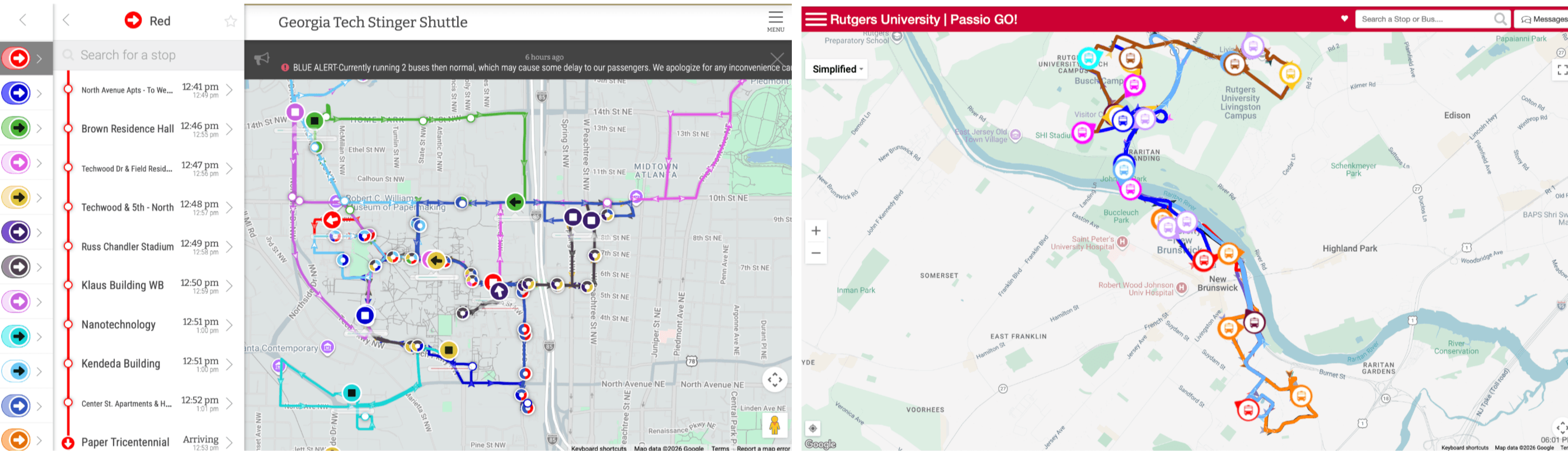 Rider-facing applications of TransLoc (Left) and PassioGo (Right), two major microtransit providers which together service more than 100 universities
Why is campus transit so outdated
Public city transit agencies do not have their own algorithms for path finding or accurate ETAs; they simply send their data to Google Maps which handles the rest. Google, however, requests accurate timetables for bus arrivals and route layouts to ensure quality, and this is not feasible for campus transit.
-
Campus transit is inherently unstable
It is difficult for campus buses to have a timetable due to heavily fluctuating passenger loads around the start or end of class times which can lead to bus bunching, an instability in high frequency transit systems that lead to unreliable schedules. (https://www.tandfonline.com/doi/full/10.1080/01441647.2024.2313969).
Furthermore, routes change frequently due to construction, sports games, or concerts, and constantly updating route information to reflect this requires effort from campus IT departments.
-
Campus IT departments don’t have resources or financial incentive
Not only are campus IT departments under-resourced, they lack a financial incentive to invest time and money to maintain a reliable feed of data.
This can be contrasted with shuttle agencies for shopping centers who are financially incentivised as it increases discoverability and makes it easier for customers to reach the shopping center.
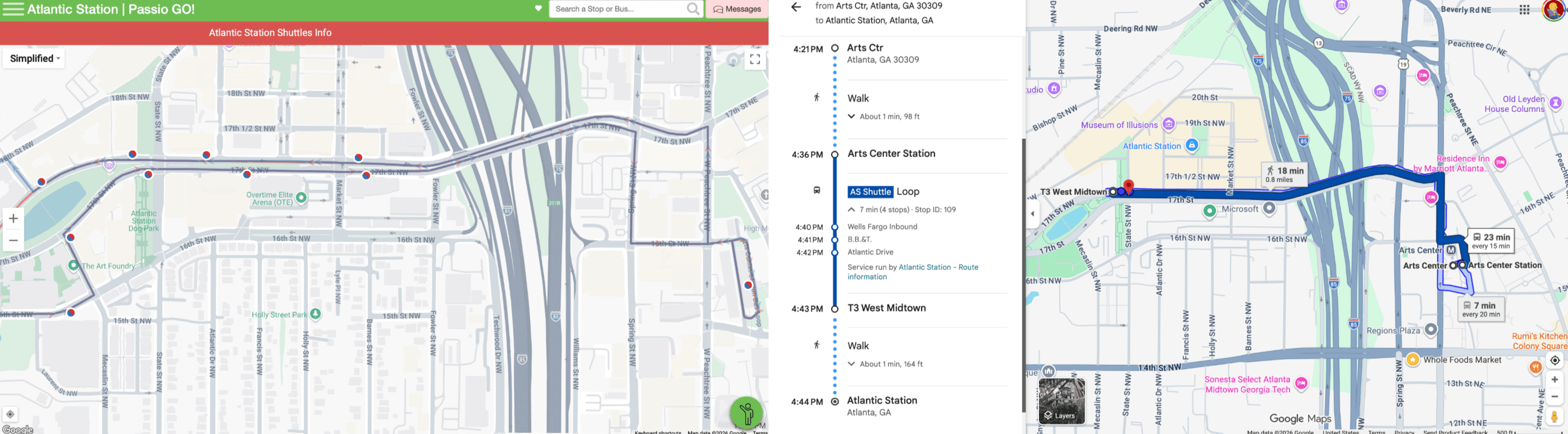 Atlantic Station, a shopping center in Atlanta, on PassioGo (Left) and Google Maps (Right)
Project goals
It is clear that campus transit systems in the US are outdated, but providing modern technological capabilities requires addressing the issues specific to campus transit that make it so difficult to have accurate and up-to-date data.
This project aims to modernize campus transit with the following goals:
- Predict accurate ETAs using statistics and machine learning
- Automatically map campus transit data to provide always up-to-date route information
- Find bus paths given a origin and destination
- Provide an easy-to-use interface that ties everything together
For the scope of this project, I will focus on Georgia Tech’s campus which is serviced by TransLoc.
Predicting ETAs with Machine Learning
TransLoc’s prediction algorithm and performance
TransLoc predicts ETAs using static assigned numbers for each stop and adding them to calculate ETAs.
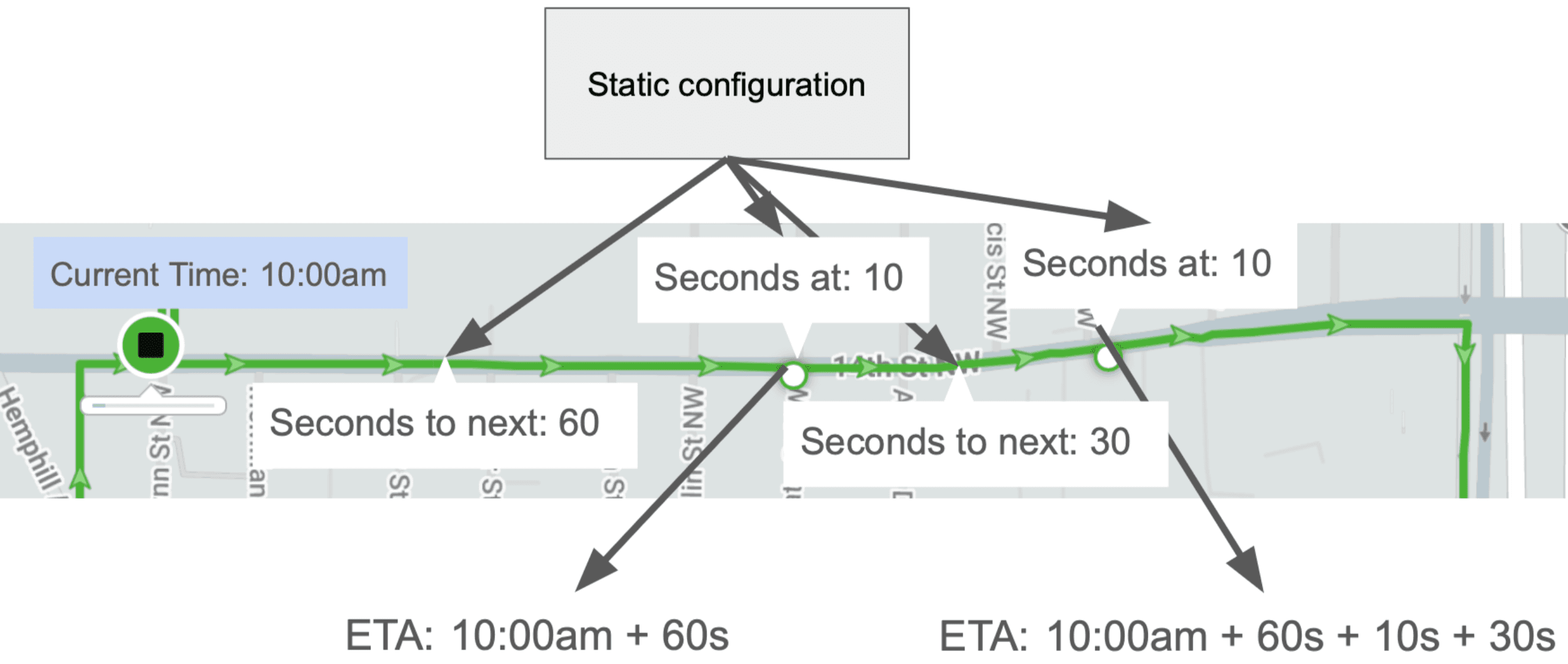 How TransLoc calculates ETAs
Although this is a simple and scalable solution from TransLoc’s perspective, due to varying traffic and bus bunching, it can lead to highly inaccurate ETAs. The plot below shows the prediction error by time horizon. We can see that, while error decreases as the time horizon decreases, there is a large positive bias meaning the system predicts the bus will arrive earlier than it actually does.
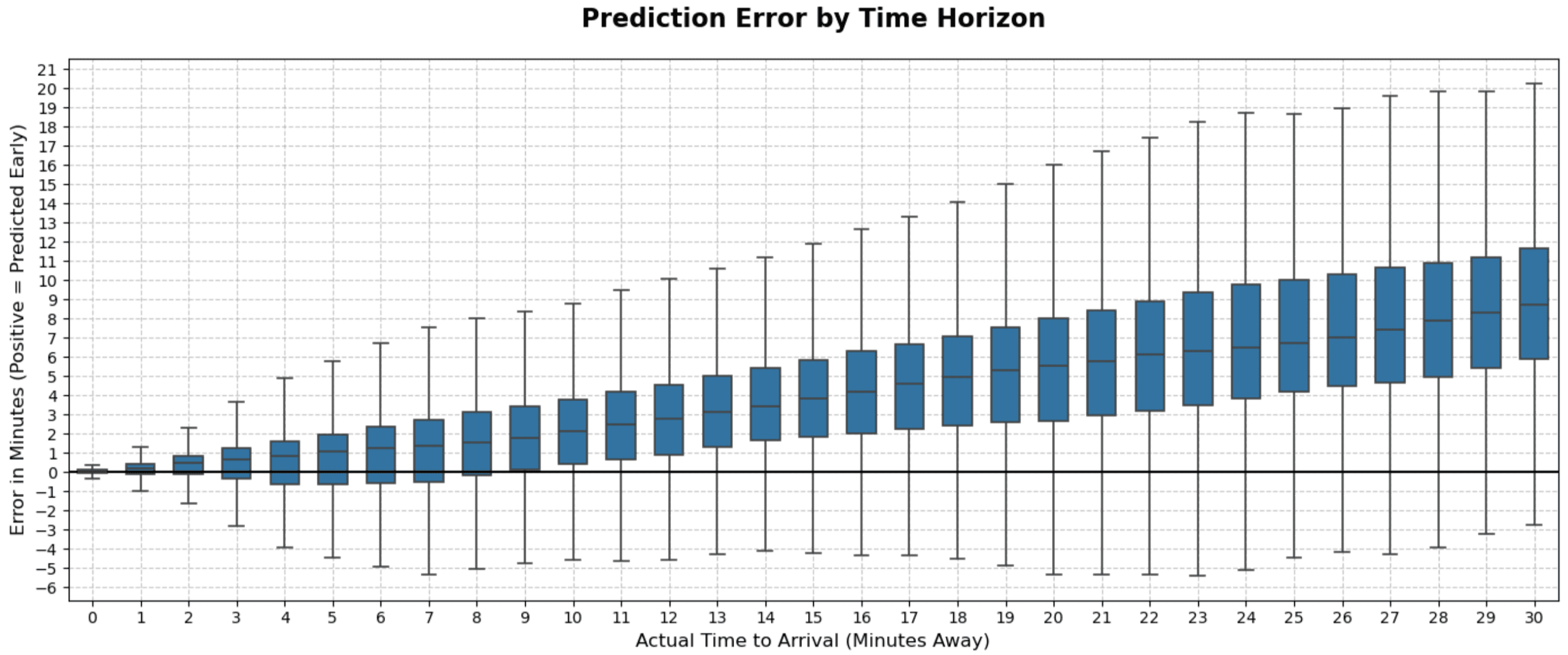 TransLoc’s prediction error by time horizon
The mean absolute error (MAE), median absolute error (MedAE), and root mean square error (RMSE) are also measured:
- MAE: 272.42 seconds, MedAE: 198.73 seconds, RMSE: 375.22 seconds
Getting the data
Data is required for applying ML algorithms. TransLoc does not have a documented API for getting route layout and live bus information, it has public endpoints that can be accessed. To collect this data for training, I set up a virtual machine (VM) to ingest and store data into a PostgreSQL data lake in Google Cloud Platform (GCP).
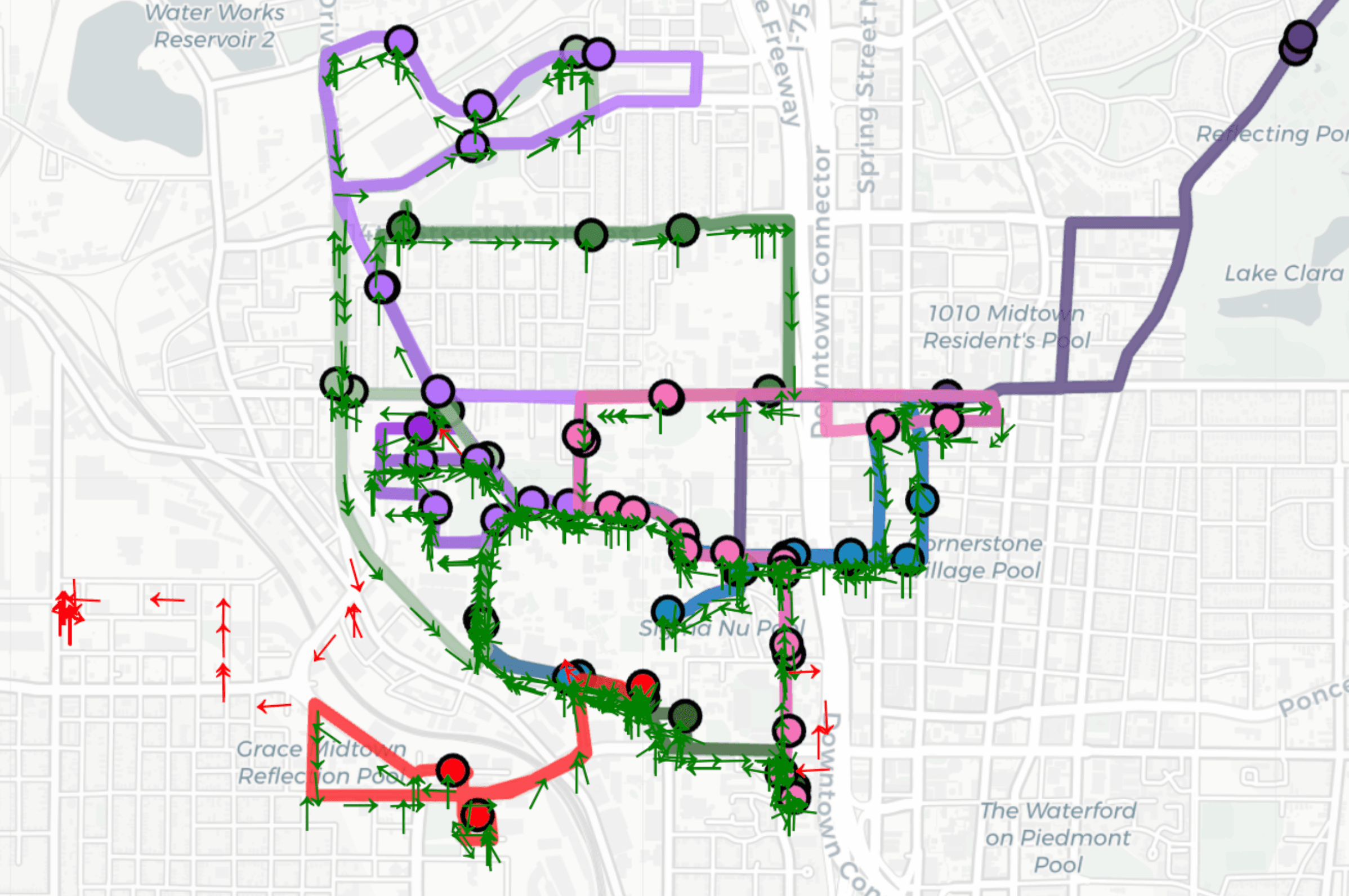 Historical bus location data plotted onto routes drawn using data from endpoints
Turning data into information
-
GPS trails are useless without context
Although I had a growing data lake, it had no context on what stop the bus was at, how long the segment took, or the arrival times.
-
Arrival detection
To make meaning from this data, a way to detect arrivals is required. My first approach was simply using a distance threshold. However, this causes false arrivals if there are two stops on either side of the road.
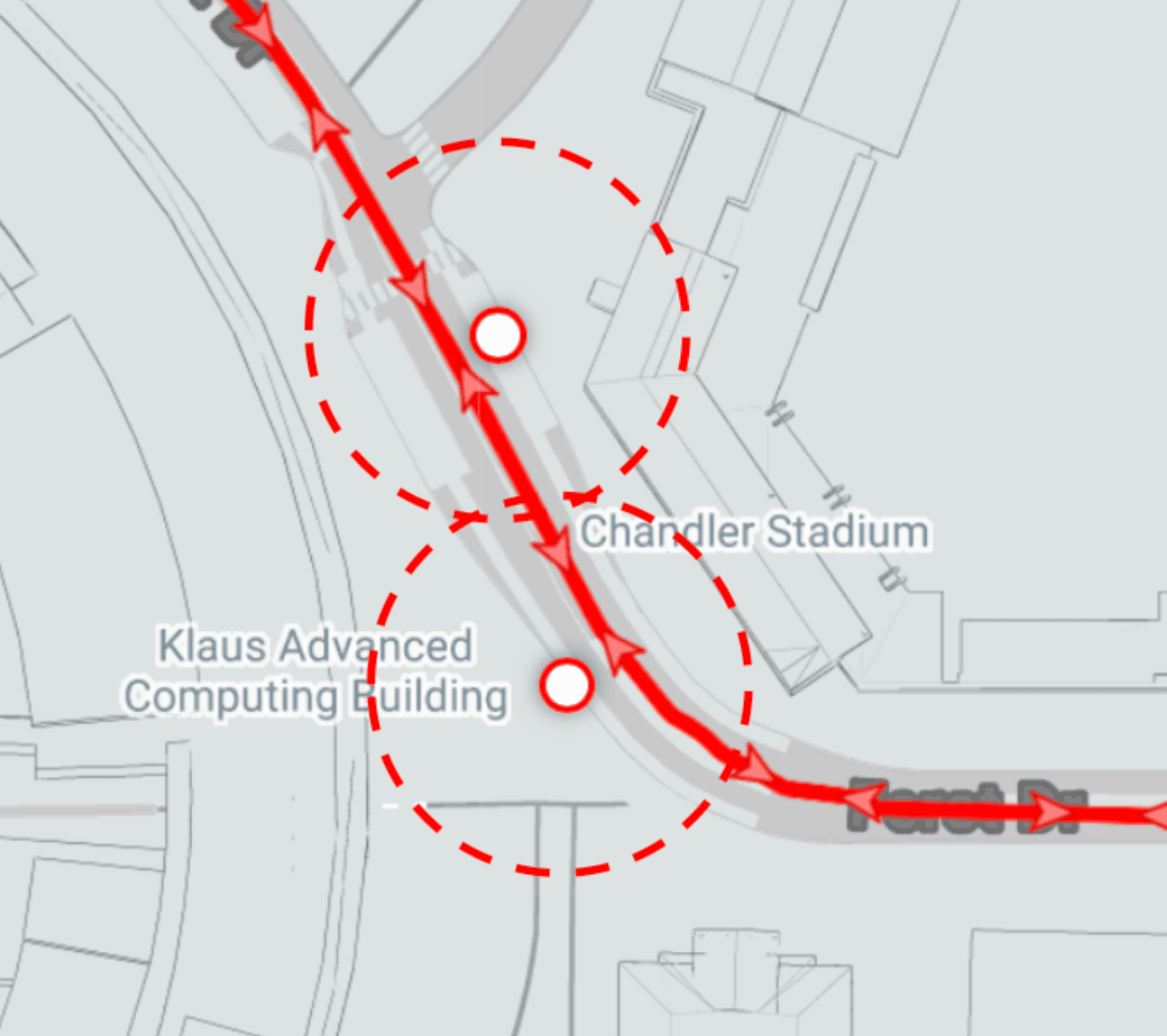 Example of when relying on proximity fails
I refined this by adding a heading check between the vehicle and the stop’s geometric heading.
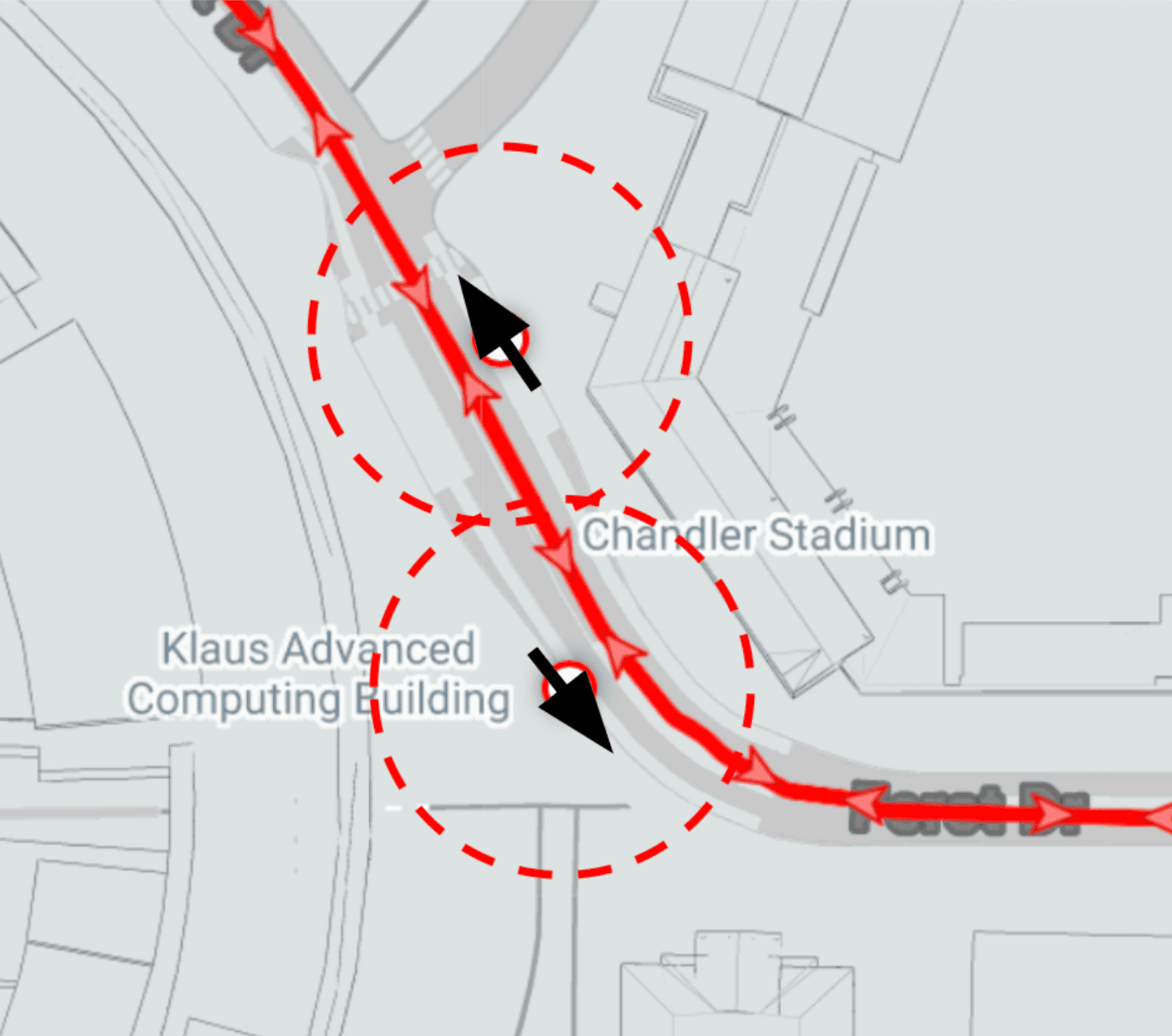 Arrival detection with proximity and heading check
-
API Errors
Although this worked perfectly in most cases, I found that it did not detect arrivals in some situations. After looking for various causes, I found that sometimes the API reports the bus’s route as something else.
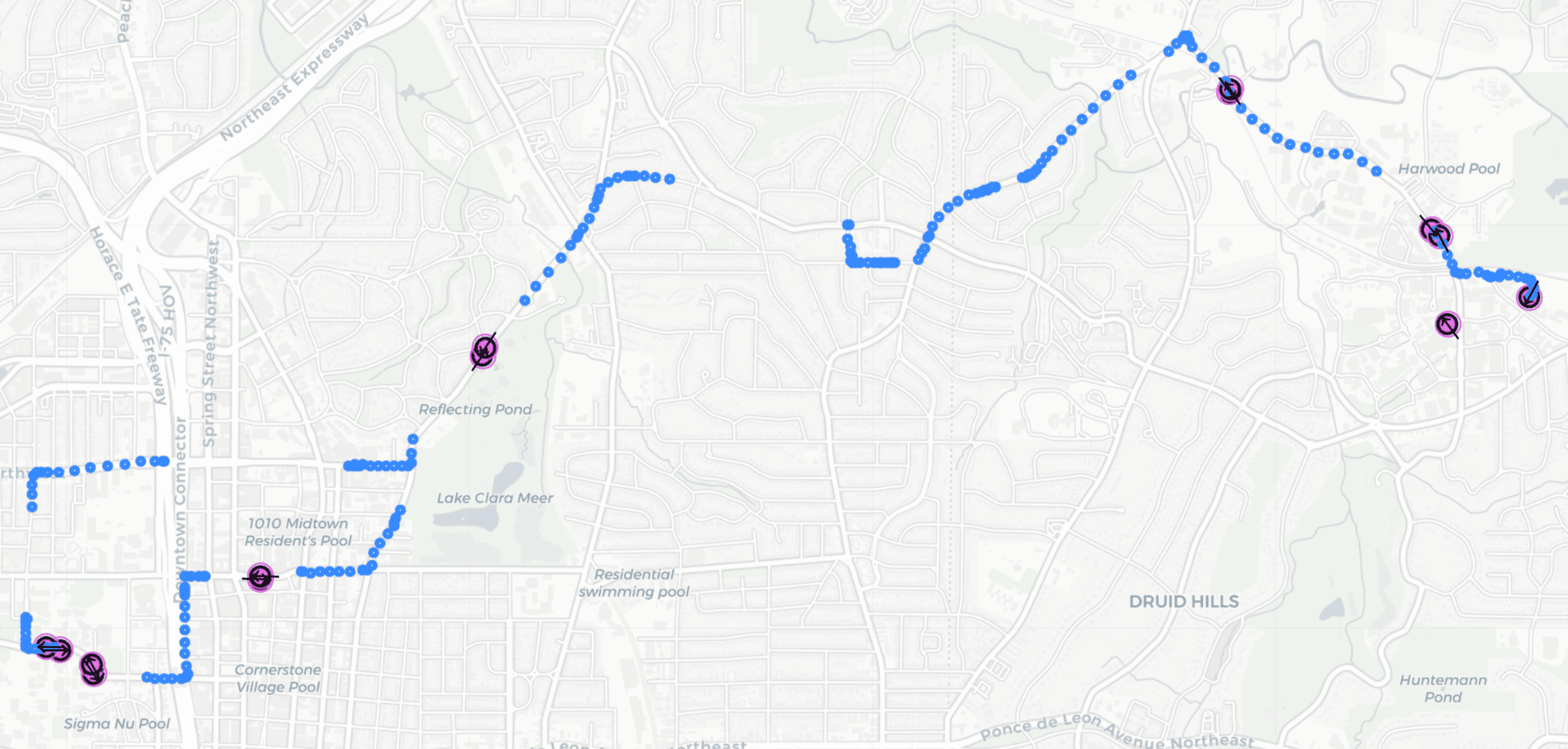 API reporting false route ID
The image above shows the path history for a specific route. The missing areas are where the vehicle’s route is falsely reported as something else. To fix this, I made the buses stick with their original route IDs unless the API consistently reported a different route ID than the original one.
-
-
Visualization of contextualized data
We can now successfully turn raw GPS pings into segmented data. White markers represent when the bus is entering or leaving a route. It is treated as unknown since there is no reliable way of knowing the total time of those segments.
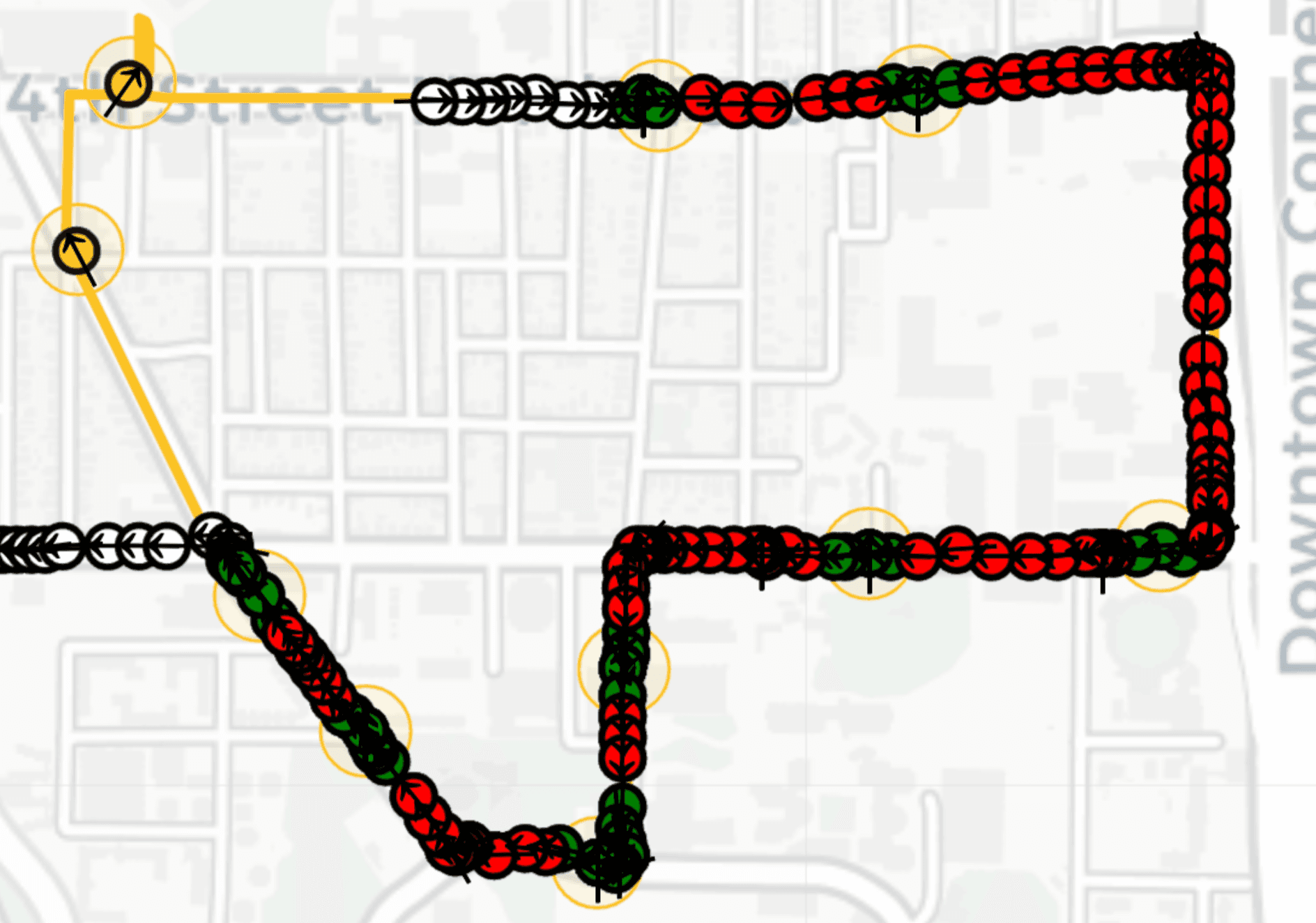 Green: arrived, Red: moving, White: unknown
 -
Example of generated datasets
With a reliable way of detecting arrival, I can now generate a dataset that can be analyzed and used to train ML models. The data is split into stop and segment data. Both contain identifiers for which stop or segment the row corresponds to, the start time of the event, and the total seconds it took.
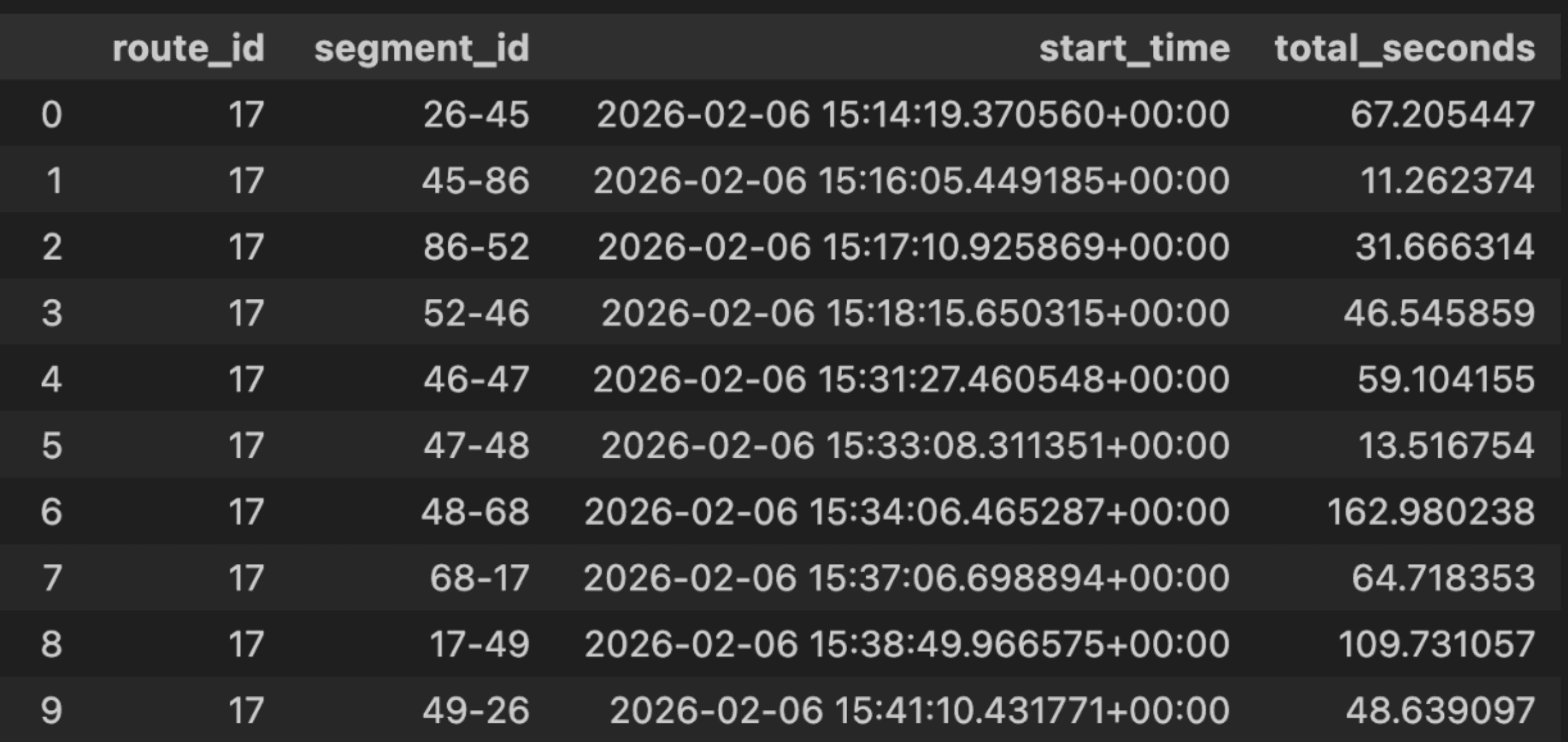 Segment dataset
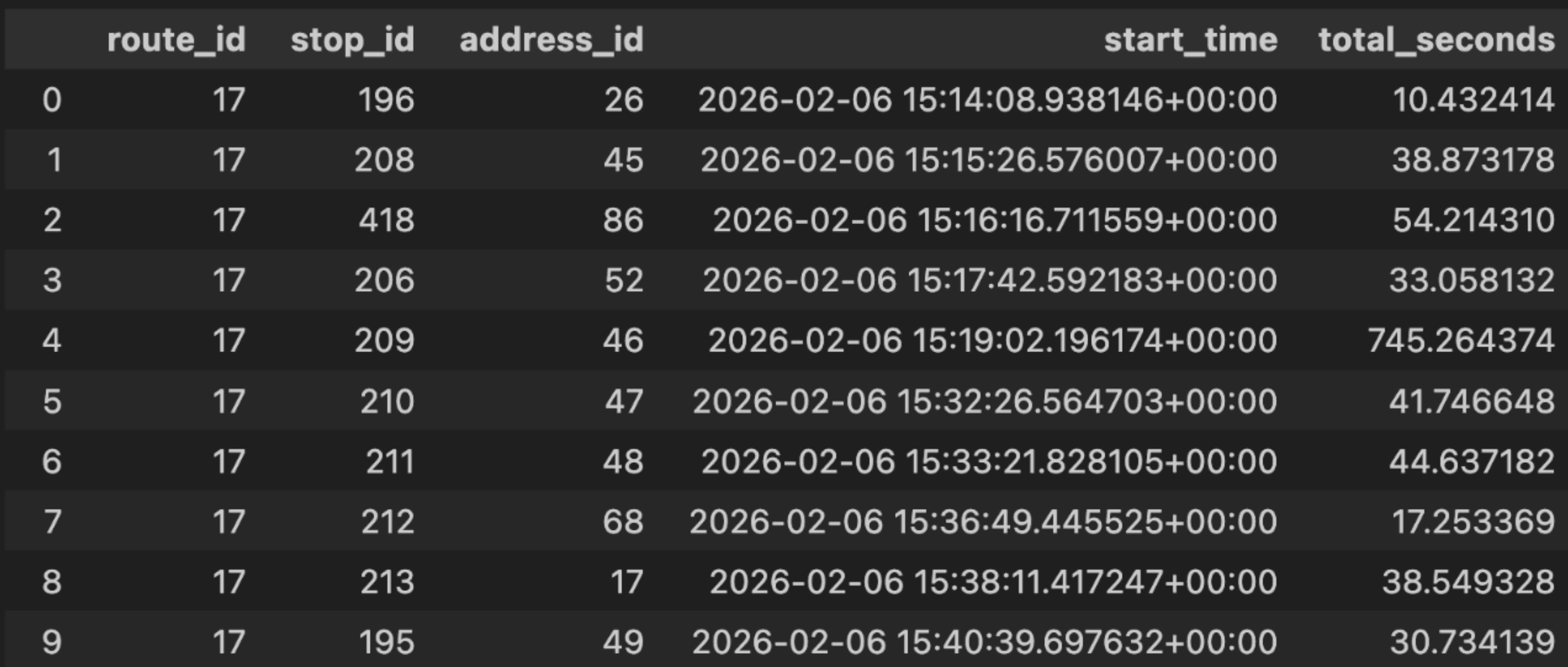 Stop dataset
Exploratory Data Analysis
Before training the ML models, I performed exploratory data analysis (EDA) to understand the data through visualizations and statistical measures.
-
Distribution of data
After setting aside 20% of the data to prevent data leakage, I first looked at the distribution of the total seconds for each dataset. It can be seen that both datasets have extreme outliers and have a positive skew. This can be caused by bus drivers staying at a stop for large amounts of time or accidents.
Additionally, the stop dataset has almost twice the standard deviation of segment data, signifying higher natural variance due to breaks or driver changes.
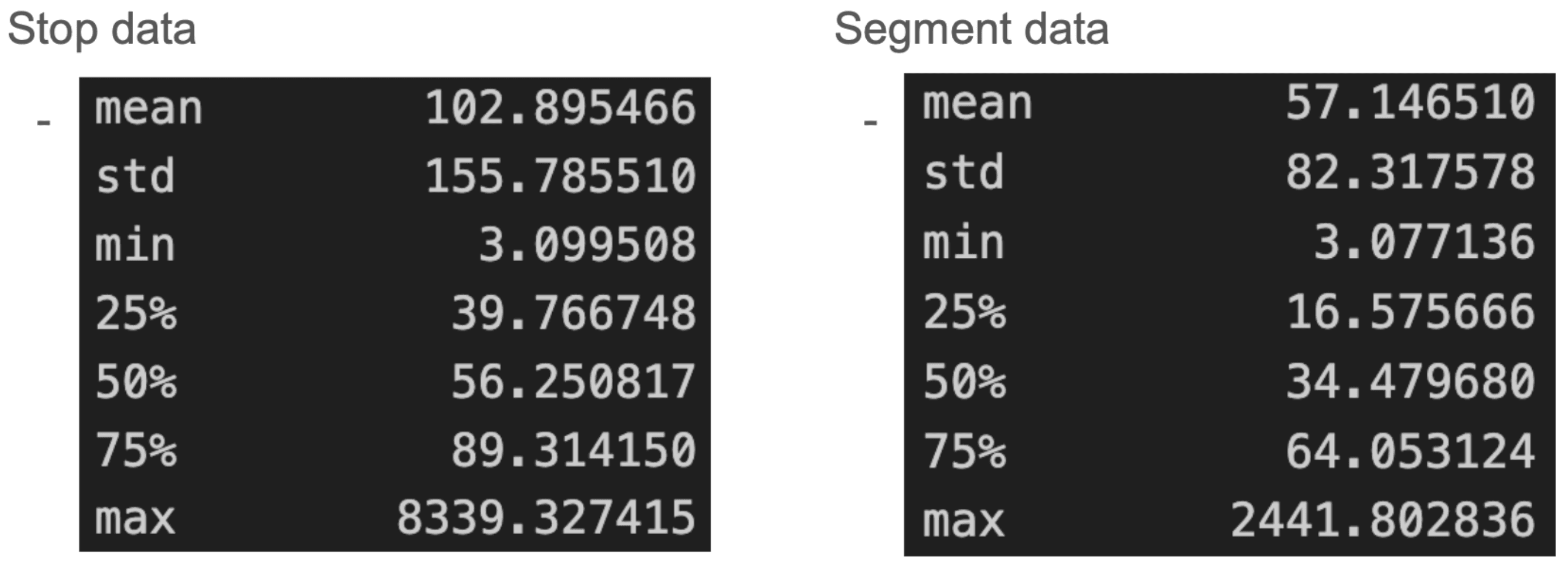 Distribution of Stop and Segment datasets
 -
Plotting target variable by various features
Plotting the target variable by various features can reveal relationships between the features and target variable.
-
Plot by hour of day
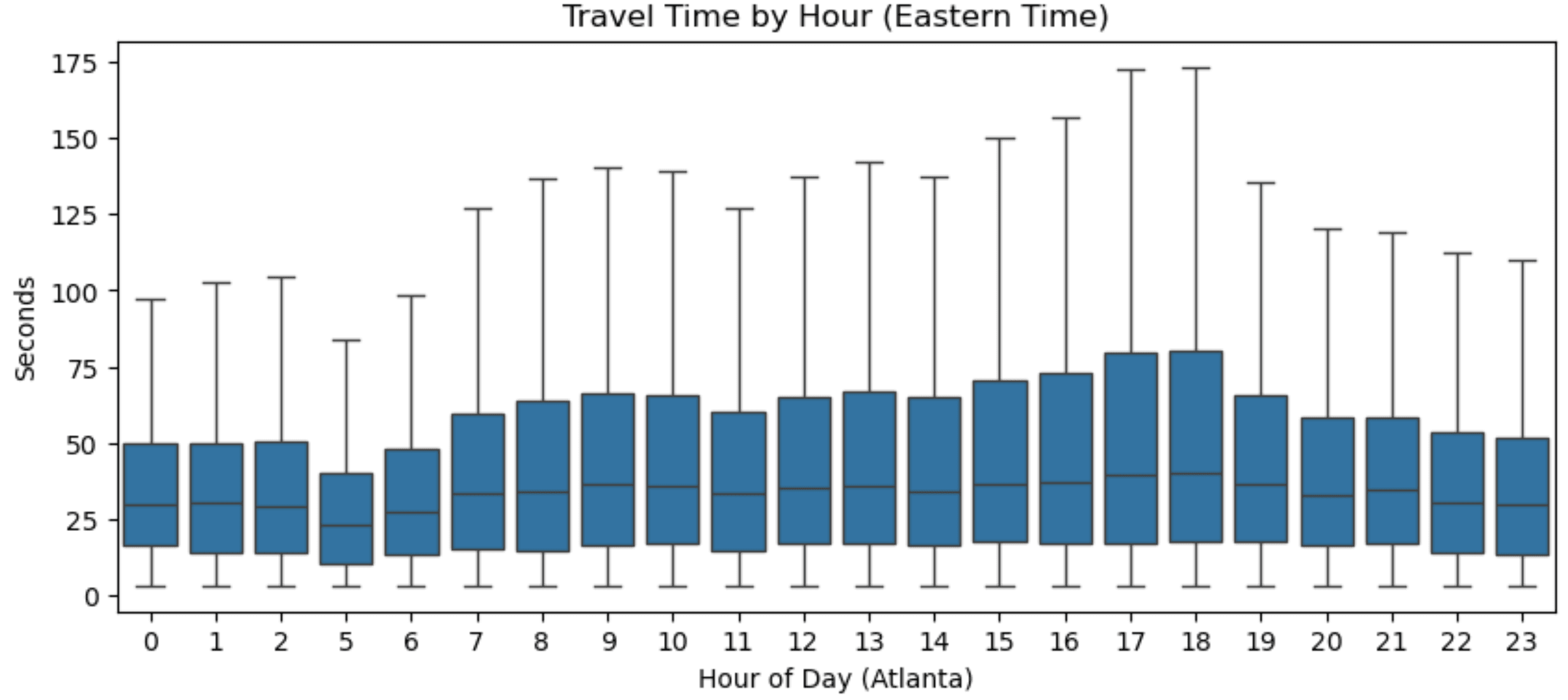 Time of day and Stop total seconds
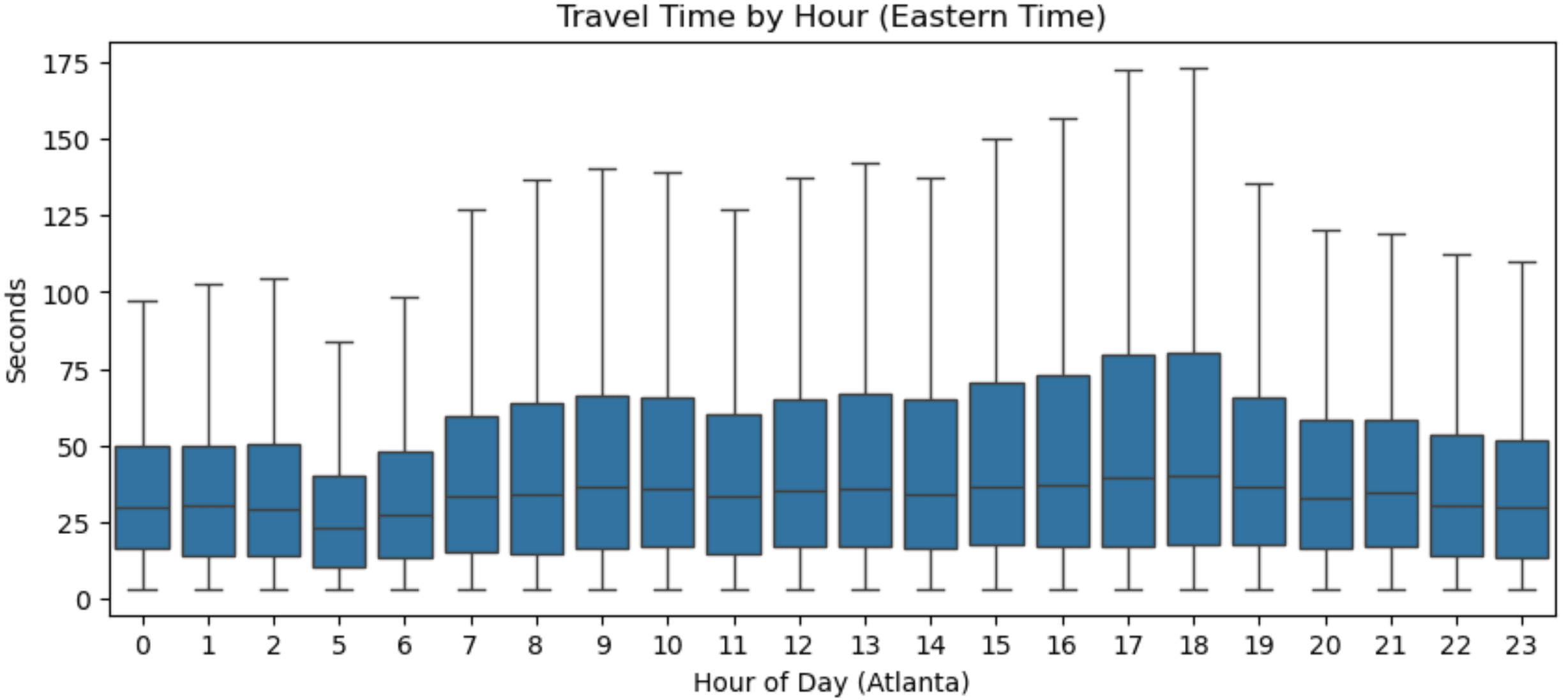 Time of day and Segment total seconds
These plots show minor traffic peaks around commuting hours.
-
Plot by Stop/Segment IDs
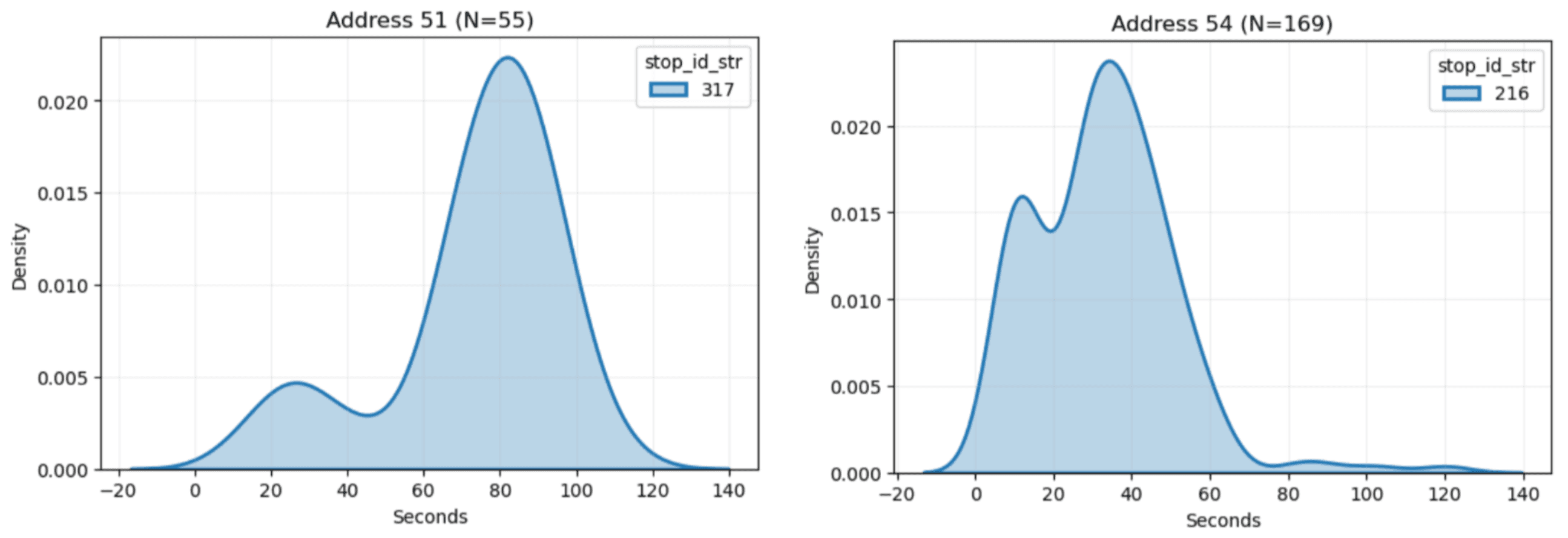 Distribution of Stop total seconds in Stop 317 vs Stop 216
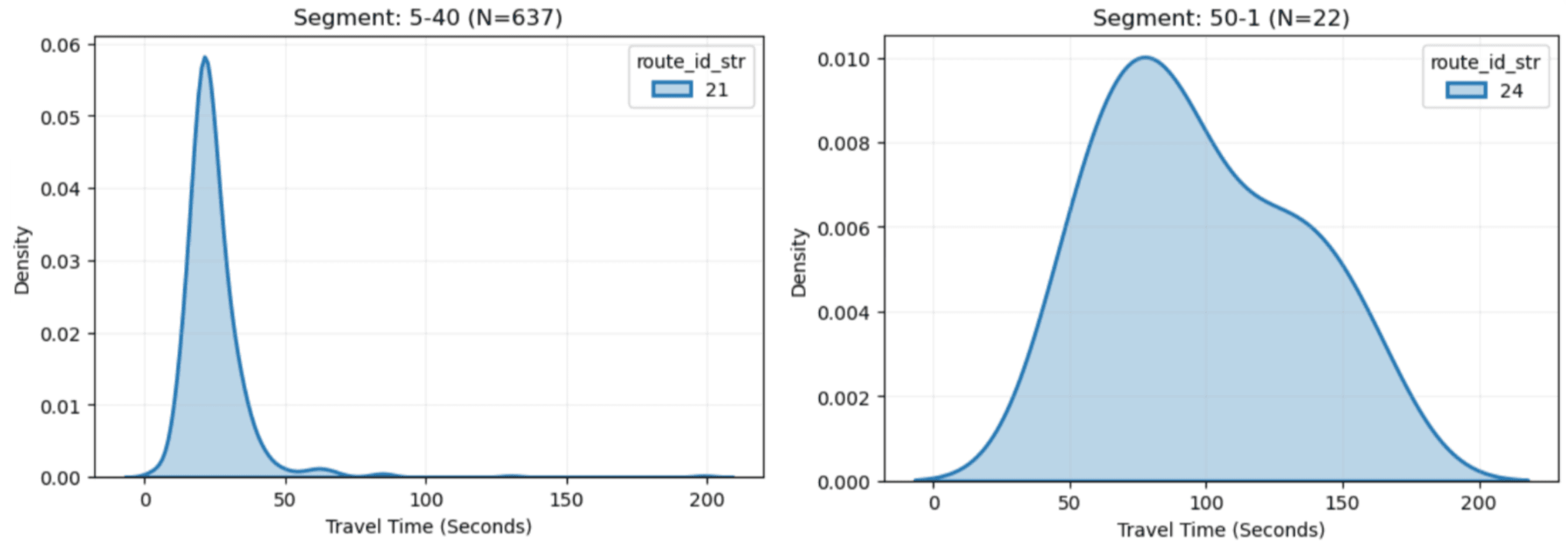 Distribution of Segment total seconds in Segment 5-40 vs Segment 50-1
We can see the distributions vary wildly by Stop/Segment ID.
-
Plot by Route IDs for the same Stop/Segment ID
Since there are multiple routes servicing a stop or passing a segment, we can plot how the distributions differ by route.
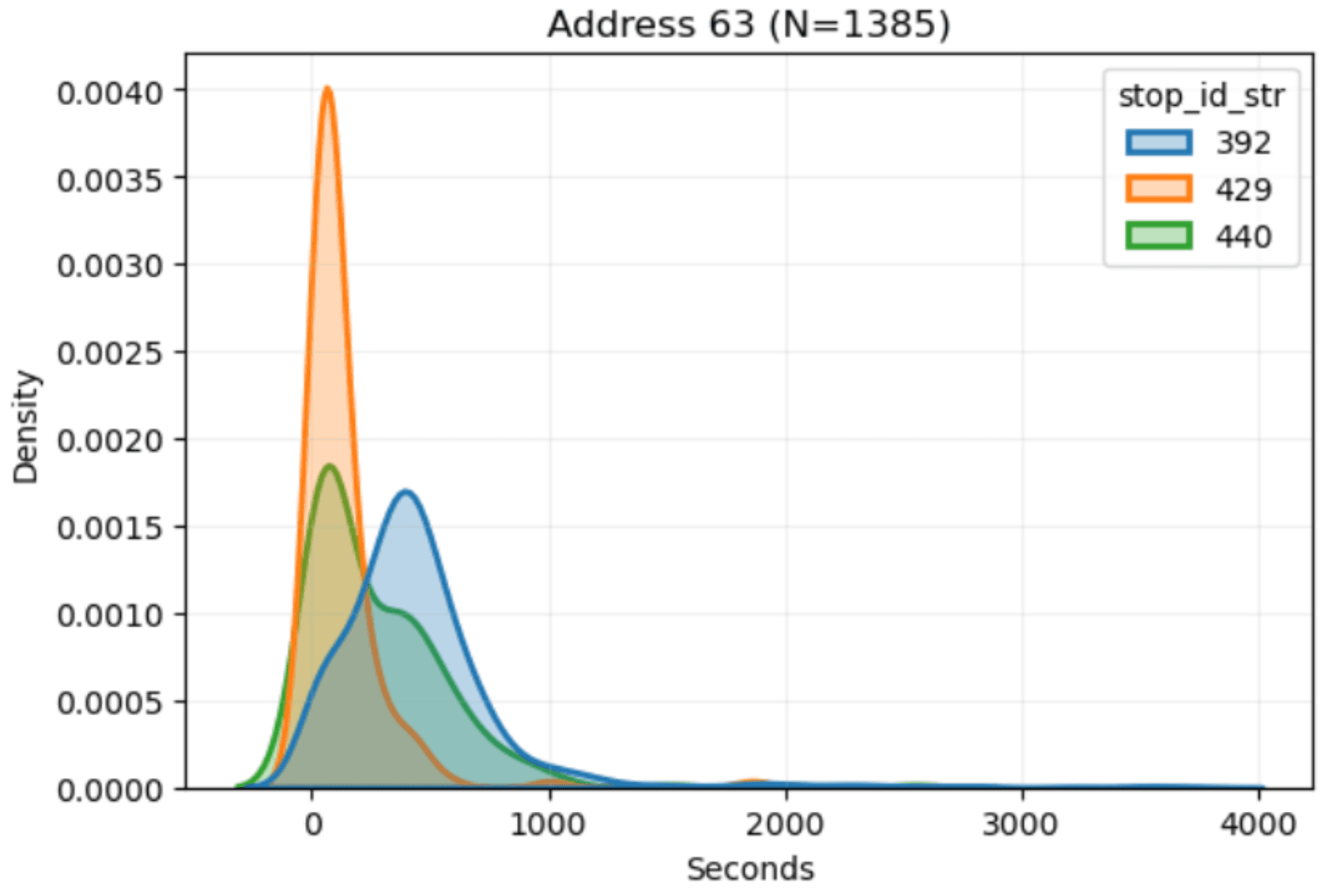 Distribution of Stop total seconds for 3 different routes in the same physical stop
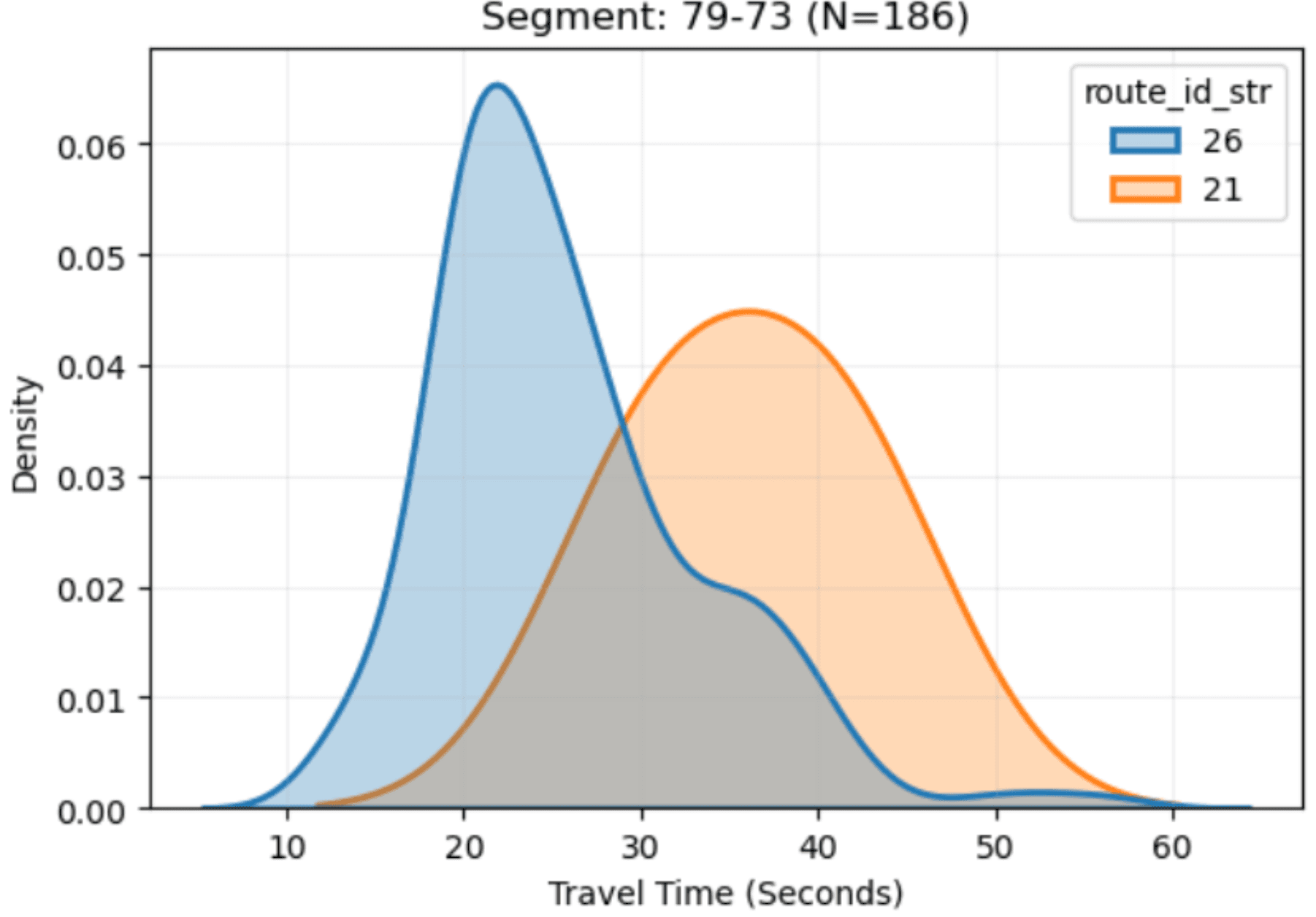 Distribution of Segment total seconds for 2 different routes in the same physical segment
-
-
What was found
Specific identifiers such as route ID, stop ID, address ID, and segment ID will be extremely useful for prediction along with other features such as time of day.
Feature Engineering
To provide more signals to the model, I engineered several features:
-
Lag features: Keeps track of the last total second for each event. Scatter plots show past segment times are strongly correlated with current times, while stop times are not
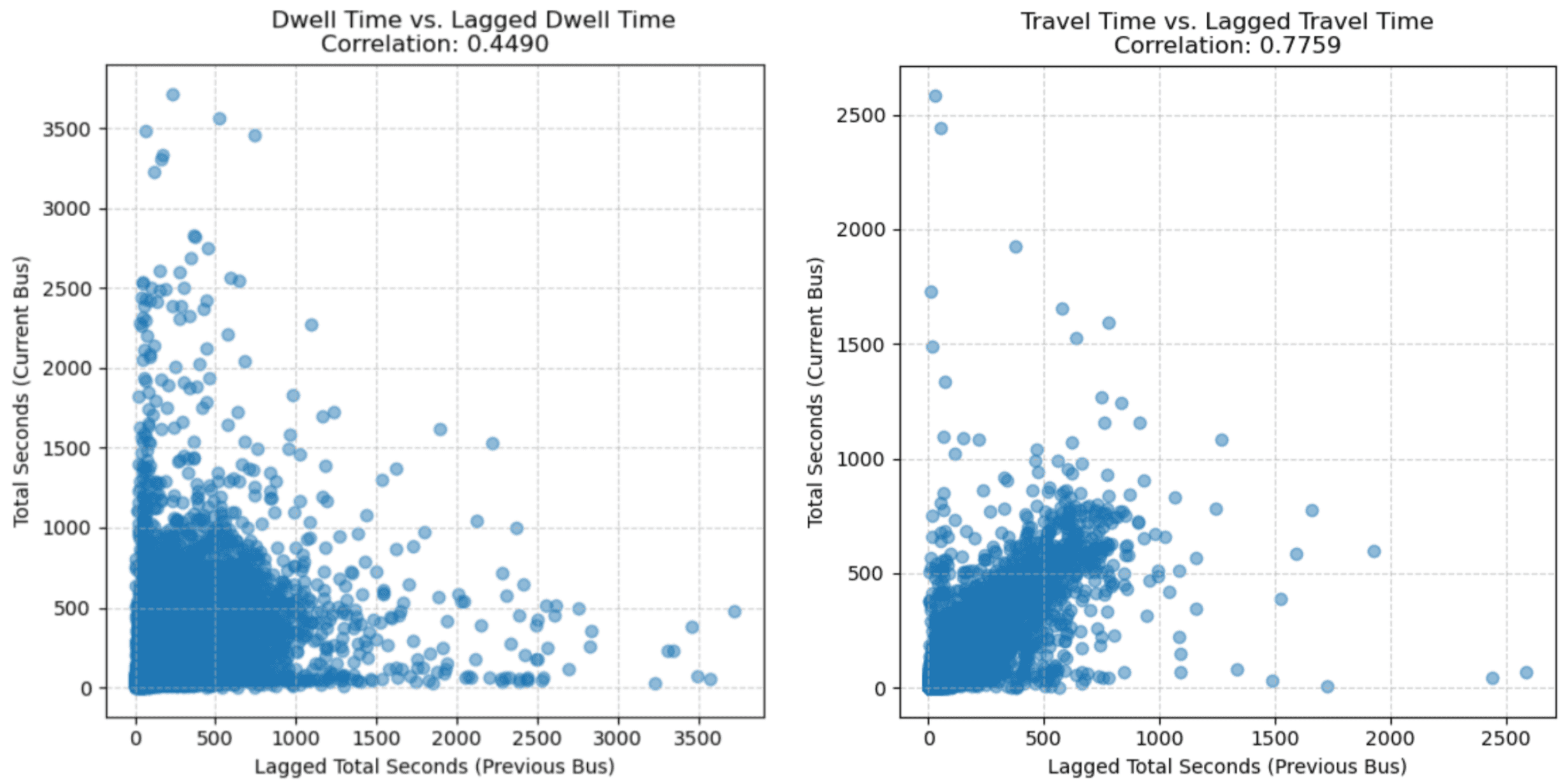 Scatter plot of Stop (Left)/Segment (Right) current by lag total seconds
 -
Miles left to next stop: A strong spatial signal for Segment total seconds
-
Exponential moving average speed: Added to smooth out the noisy raw speed feature
-
Day of week, is weekend, and fractional hour: Provides temporal context
Training and Evaluation
-
Choice of model
Based on the high number of categorical features, it was clear a tree-based model had to be used. I experimented with XGBoost, CatBoost, and LightGBM.
-
Method of evaluation
I evaluated the same metrics I measured on TransLoc’s prediction data and plotted the same error by time horizon plot. To ensure accurate results, time series folds were generated using scikit-learn’s TimeSeriesSplit, and each fold was further divided into train, validation, and test splits. The train dataset was used to train the model alongside the validation dataset which allowed for early stopping detection, and the test dataset was used to calculate the three metrics. Lastly, the metrics were averaged across each fold to get the overall performance for the configuration.
-
What was experimented
I experimented with different combinations of features such as adding more lag features or not using certain columns, engineering more features such as how many buses are on the route or how far away the trailing bus is, various objective functions such as L2, L1, Huber, or Quantile loss, log transforming the target column due to its high skew, predicting seconds left instead of total seconds, hyperparameter tuning using Optuna, and more.
-
Final configuration
The three models had similar performances, so I selected LightGBM for its high speed. I optimized for L1 loss, log-transformed the target variable, and used highly regularized parameters.
-
Results of each model
Stop data predictions still struggled slightly with overestimations due to high natural variance, but segment predictions were highly accurate.
The results of each model are shown below with the y axis representing seconds left and x axis showing the row number of each data point which can be thought of as a proxy for time. The blue lines are the actual seconds left and we can see that it linearly decreases down to 0 as the row number increases. The yellow lines are the model’s predictions for each data point.
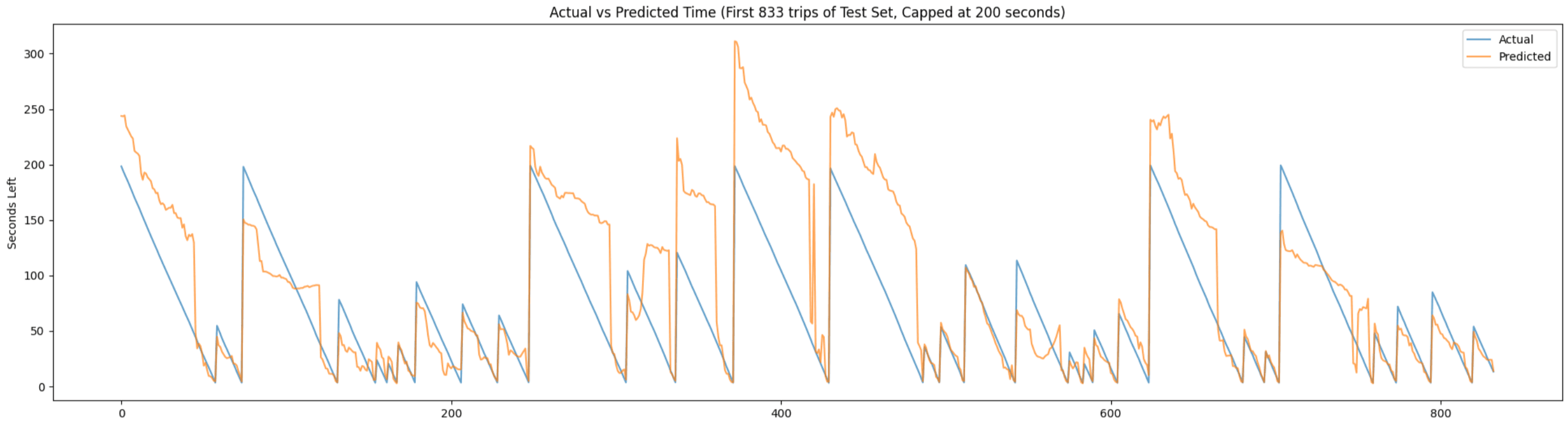 Actual vs predicted seconds left for Stops Average
- MAE: 73.54 seconds, Average MedAE: 22.42 seconds, Average RMSE: 157.99 seconds
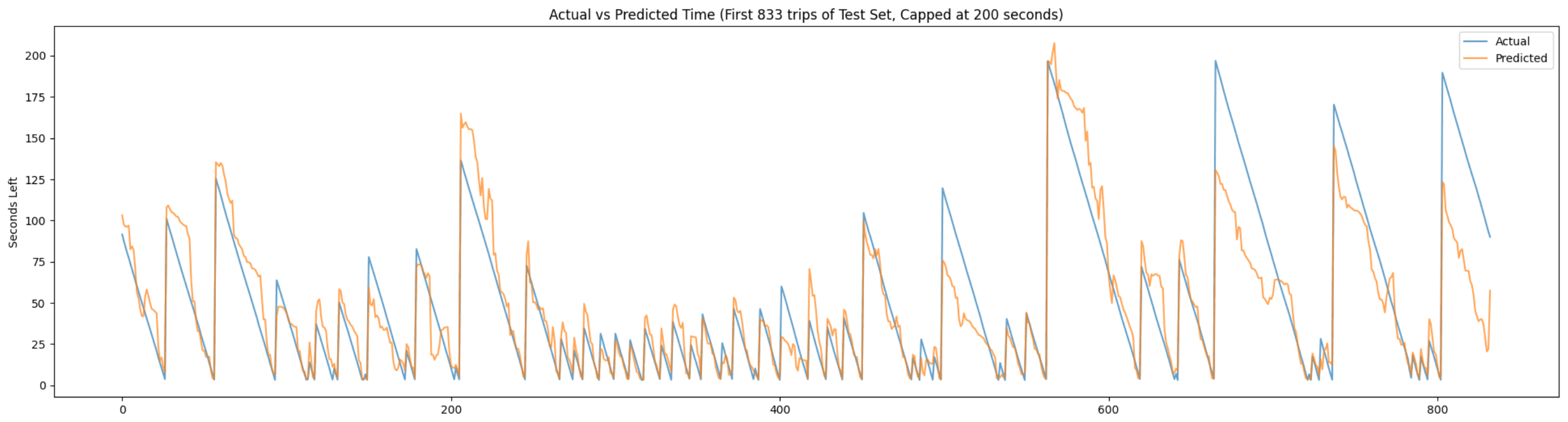 Actual vs predicted seconds left for Segments Average
- MAE: 31.27 seconds, Average MedAE: 7.94 seconds, Average RMSE: 106.86 seconds
-
Results of overall system
To use this model to generate ETAs for all stops, I used an autoregressive approach. This effectively replaces TransLoc’s static configuration with a ML model to output the seconds at stop and seconds to next stop.
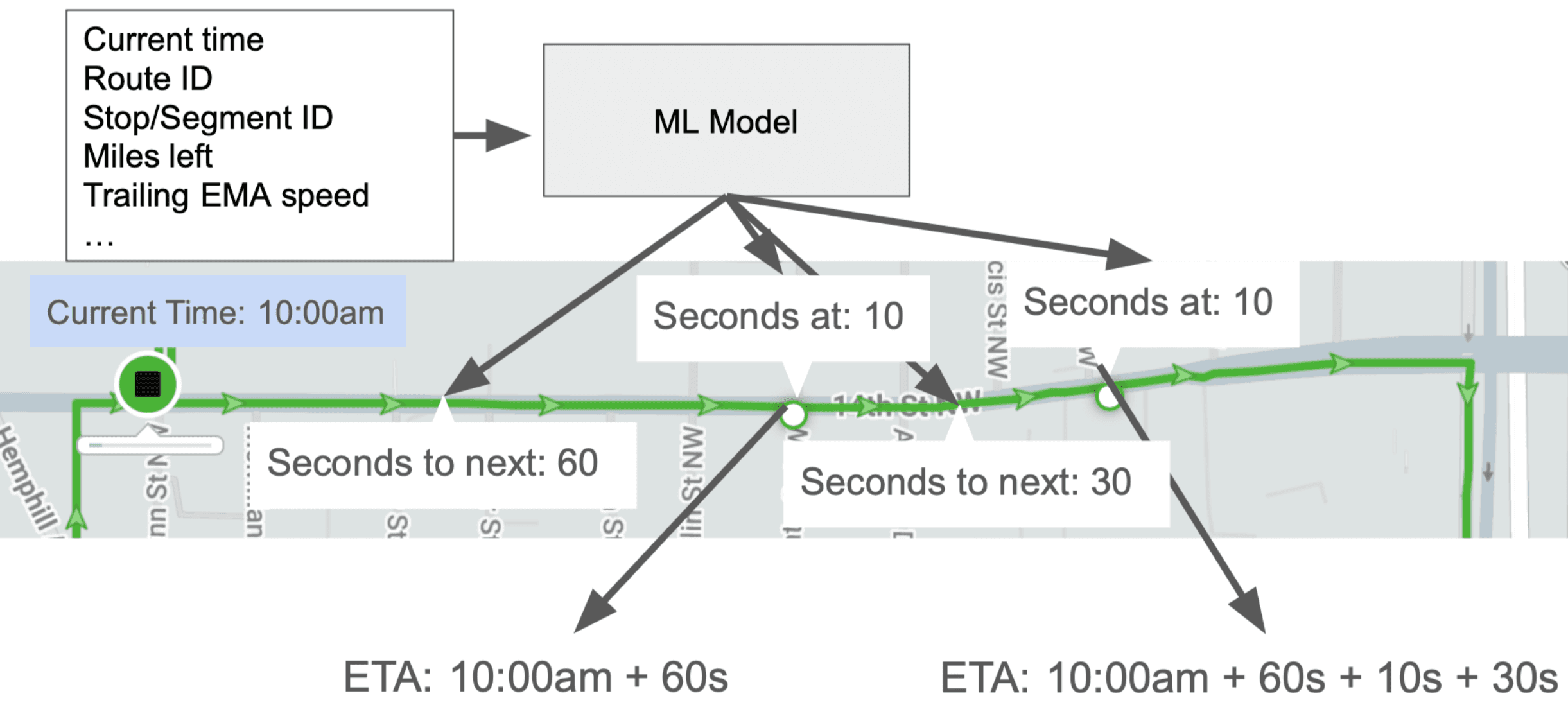 Using ML to predict ETAs
After backtesting the overall system with historical data, I evaluated its performance.
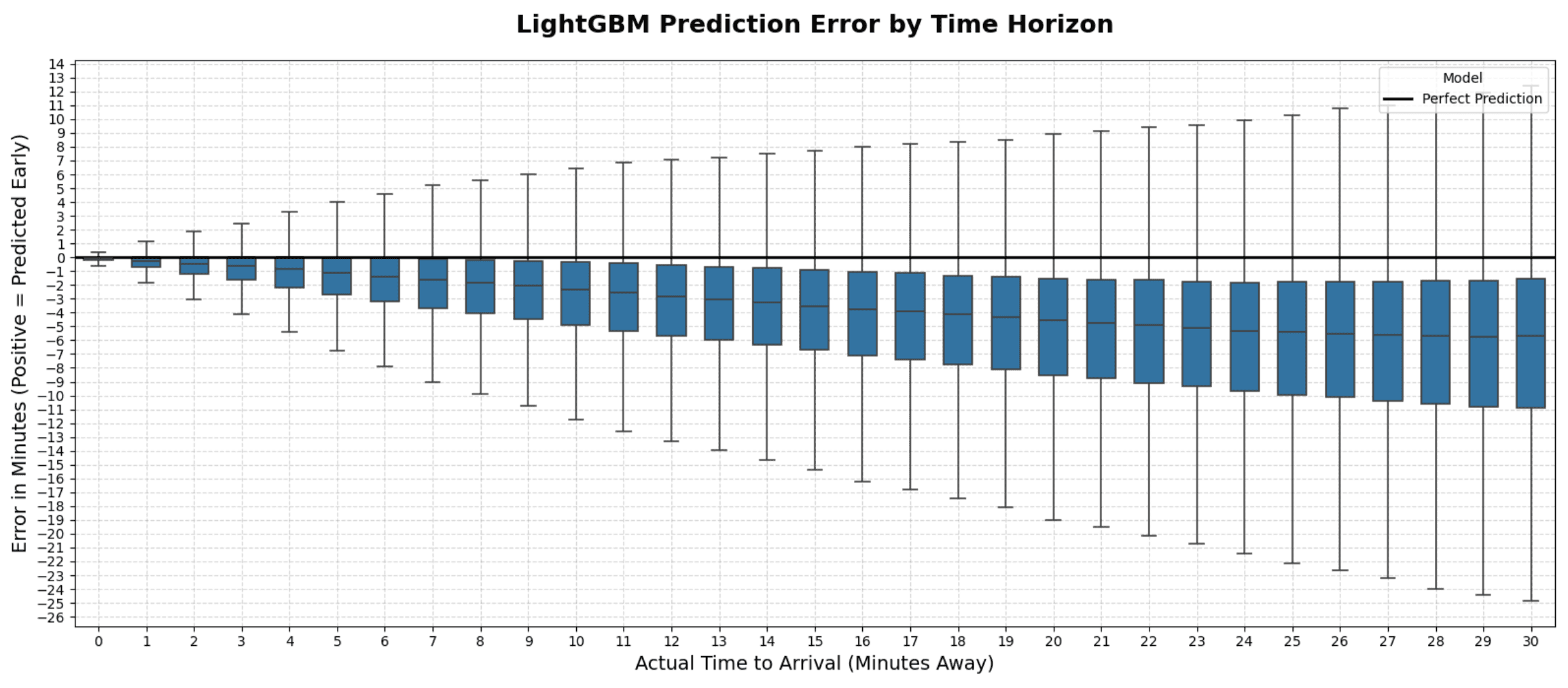 Performance of ML system MAE: 312.88 seconds, MedAE: 182.85 seconds, RMSE: 514.75 seconds
Compared to TransLoc’s predictions, we can see the amount of bias has decreased. However, there is now a negative bias, and the metrics are actually worse than TransLoc’s.
Reducing bias with Quantile Loss
-
Symmetric loss vs asymmetric loss
To adjust the bias in the overall system, I changed from symmetric L1 loss to asymmetric Quantile loss. Symmetric loss treats all errors equally, but asymmetric adjusts how much error contributes based on if the prediction is higher or lower than the true value.
By tuning the alpha value, I penalized the model more heavily for predicting late arrivals.
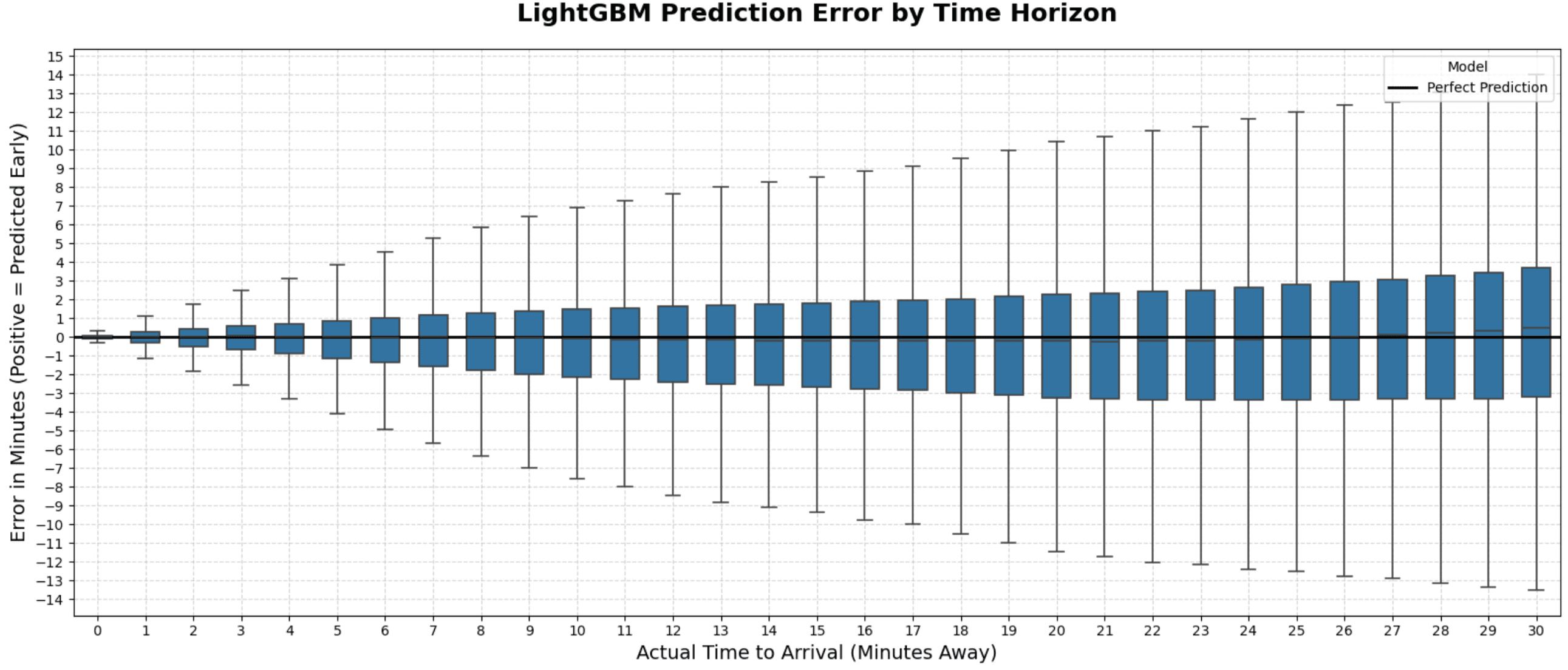 Performance of bias adjusted ML system
- MAE: 201.89 seconds, MedAE: 103.65 seconds, RMSE: 378.05 seconds
-
Comparison of TransLoc and ML ETAs
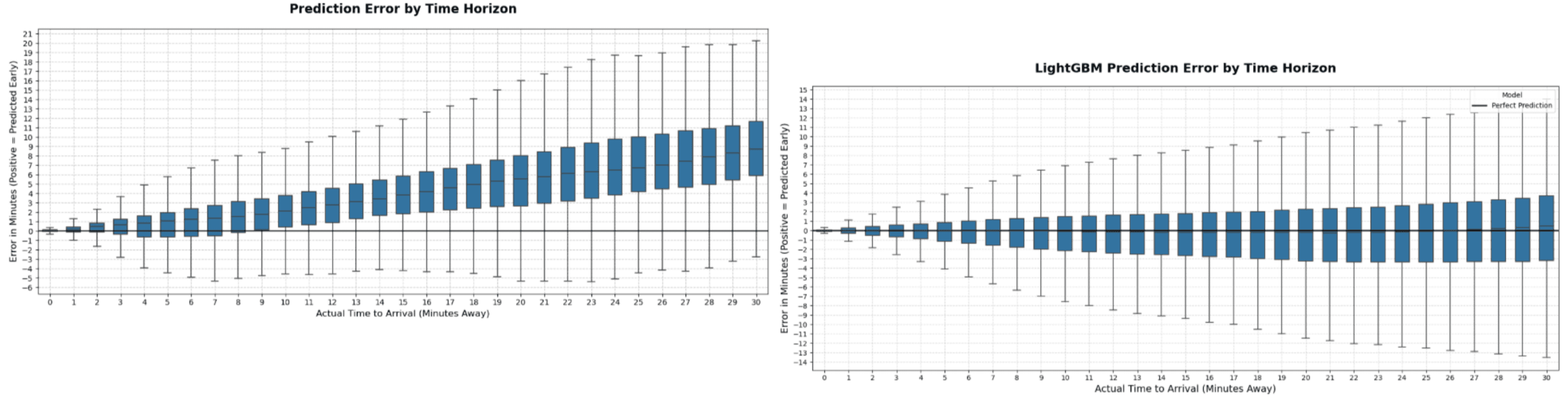 TransLoc (Left) vs ML (Right) performance
The final performance of the system shows a 25.89% decrease in MAE, 47.84% decrease in MedAE, and 0.75% increase in RMSE compared to TransLoc. The RMSE likely stayed the same as we were not directly minimizing squared loss.
Automatic mapping
Out of date API routes
Just when I thought everything was working perfectly, a 4 week construction project caused detours across 3 routes. However, the route lines reported by TransLoc did not reflect this change. The ML models had not been trained on these new route lines and constantly predicted inaccurate ETAs since the trajectories were different.
To make a system work under these conditions, I had to stop relying on the API’s static geometries. I restricted the system to only assume two things:
- Stop coordinates
- Stop headings
Generating routes using recent data
To generate a route line, I keep track of all the paths that have been discovered so far, and the recent history of paths taken. Each path has a segment ID <start stop>-<end stop> and a path ID which is unique to the geometry of the path taken within the same segment. The path history stores a recent history of the paths using a deque, and the majority path taken is considered to be the true path. To generate a route, we start at an arbitrary stop within the route and follow the true path for each stop. However, if we enter the loop at a stop that is being skipped, D in this example, we are left with a circular portion of the route and a path going into it. To prevent this, we trim any parts that do not belong to the circular portion of the route.
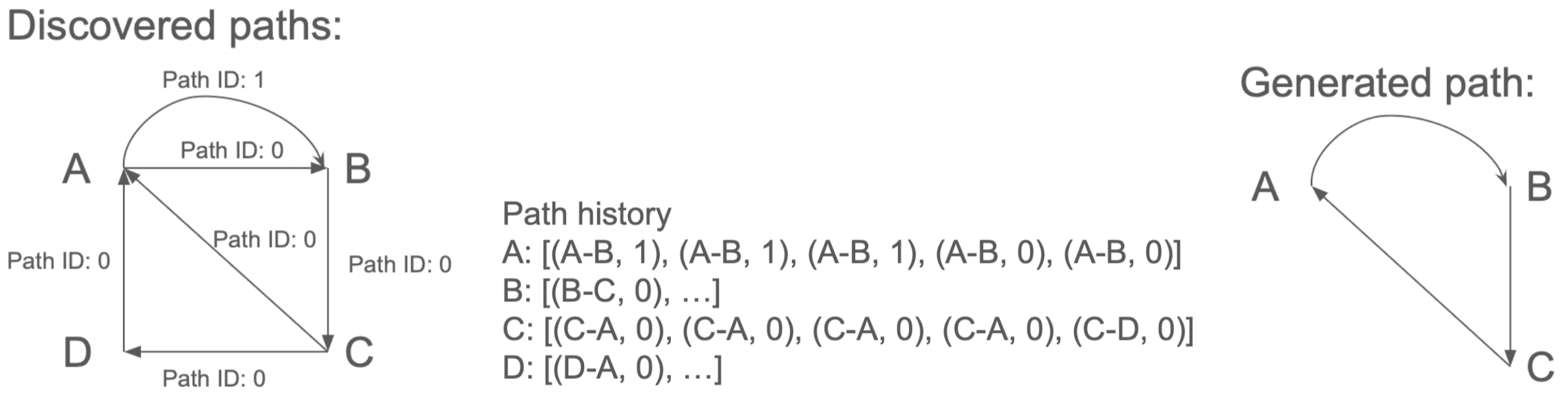 How paths are generated
Complications of automatic mapping
-
False arrivals due to less restriction
Because we no longer knew the strict order of stops, the system had to check for arrivals at any stop on the route. The lack of restriction led to false arrivals. For example, if a bus leaves Stop A and drives past Stop C’s radius while aligning with its heading, it would falsely register an arrival.
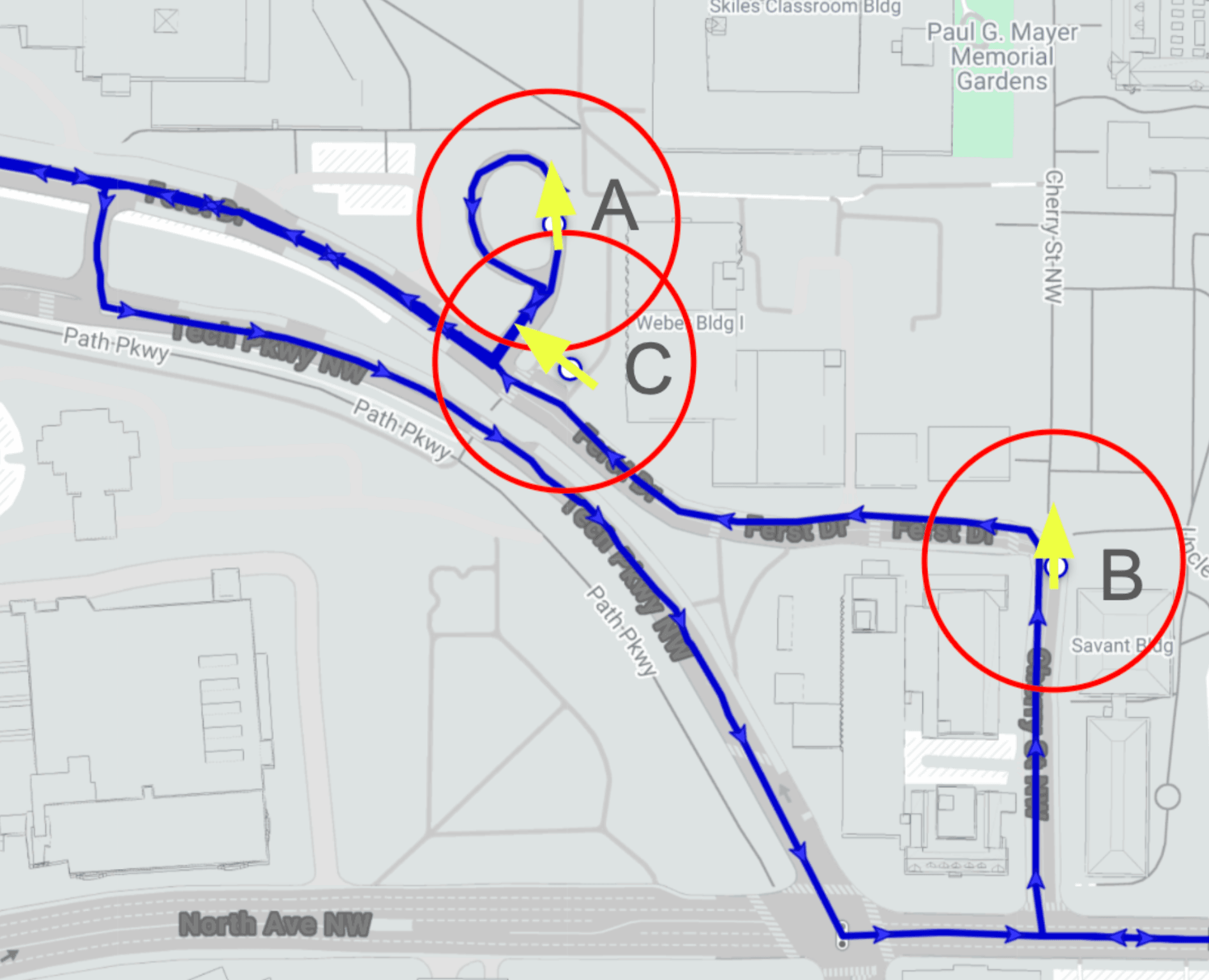 Example of edge case
 -
Double threshold approach
To fix this issue, two thresholds were required: one for detecting arrivals and one for detecting departures. By using a normal threshold to detect arrivals and a larger threshold to detect departures, we can still reliably detect arrivals, while making sure it will not detect a false arrival on its way out.
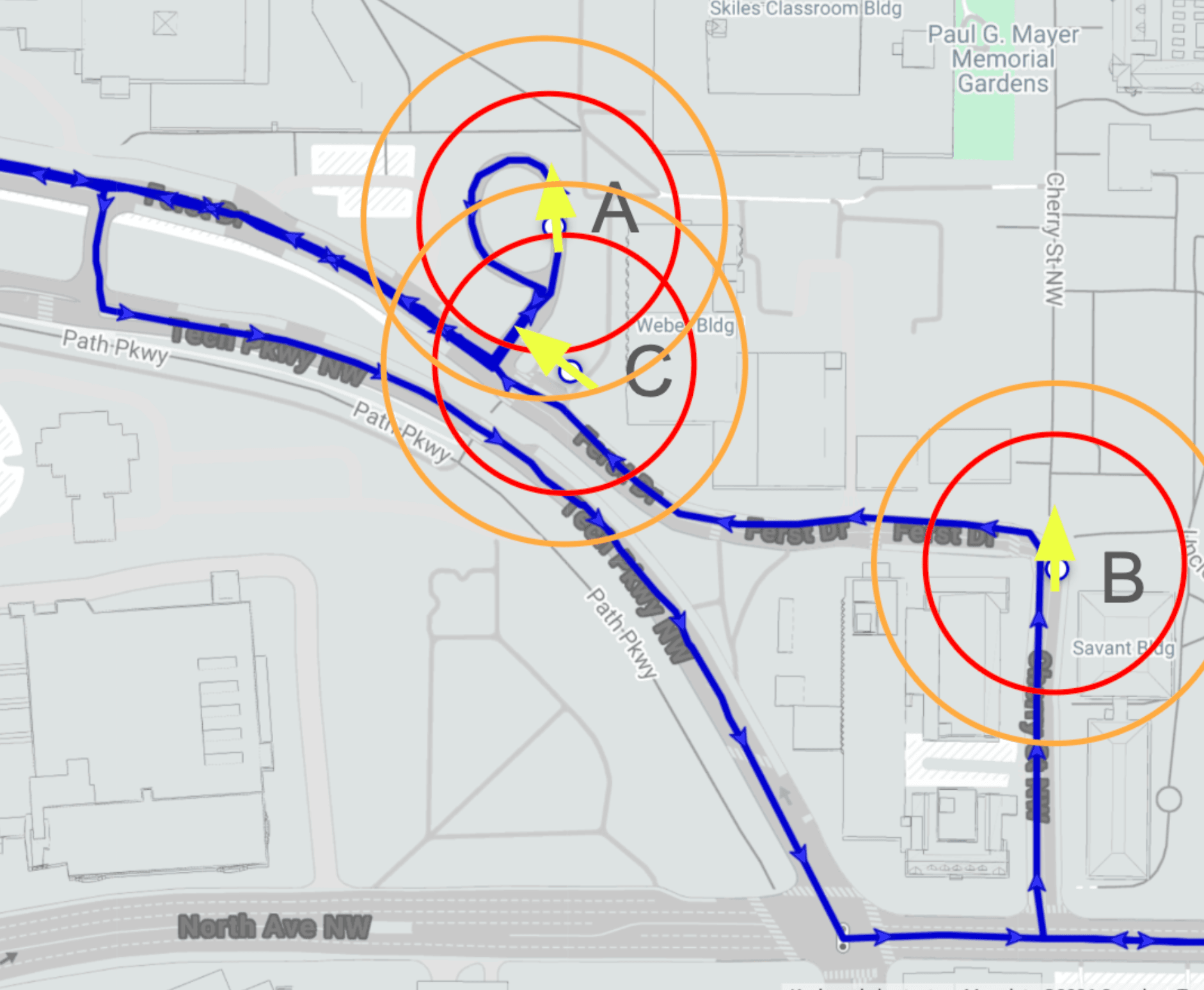 Red: arrival threshold, Orange: departure threshold
This coincidentally solved another issue regarding GPS drift that the single threshold approach could not handle.
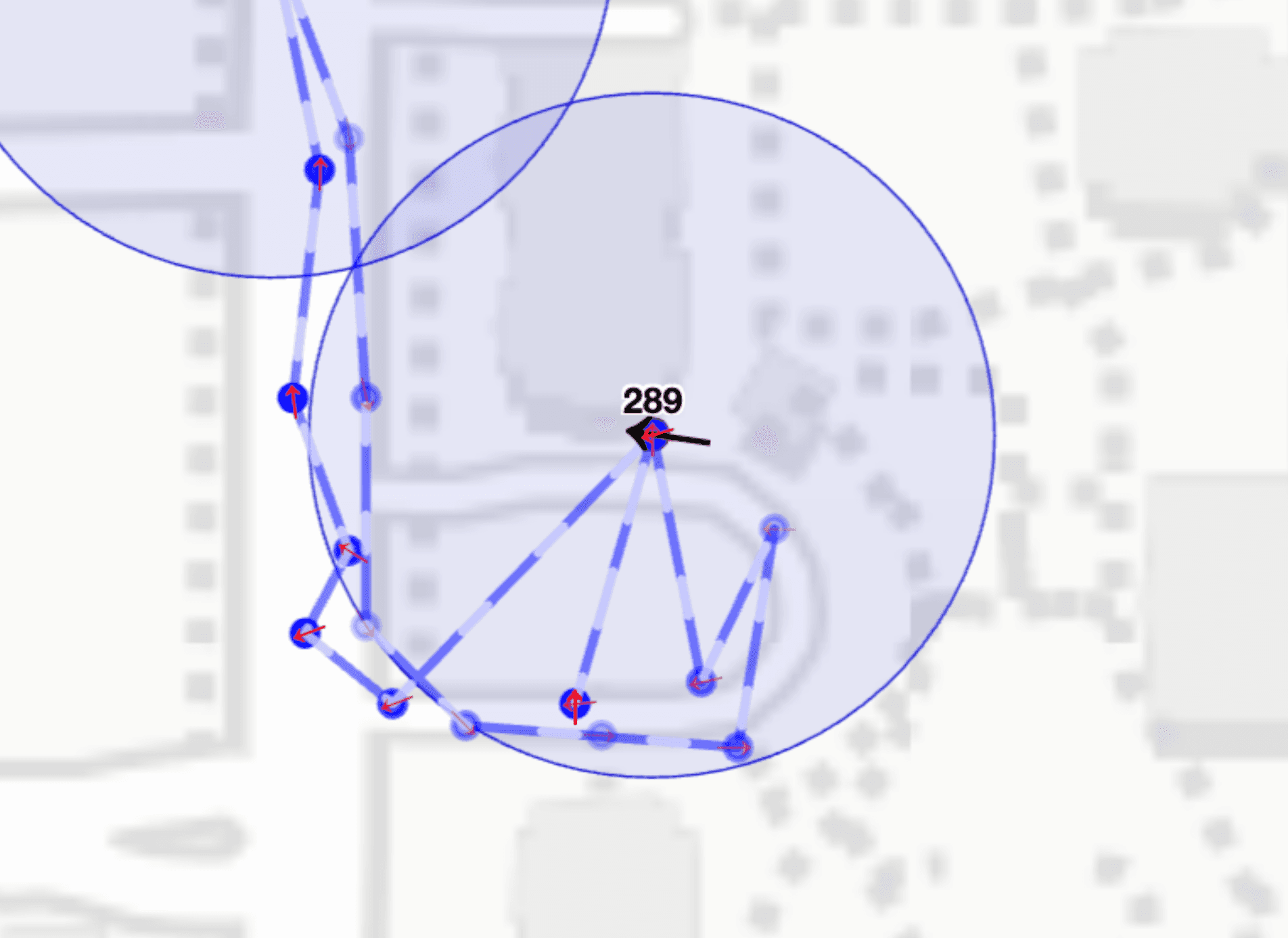 Example of GPS drift
Since GPS data is noisy, it can sometimes report a coordinate that is far from its true location causing false departures. However, with larger departure thresholds, departures are not triggered as long as the GPS drift isn’t extreme.
Comparison of API route and generated routes
Now, the routes are generated based on where the buses actually travel.
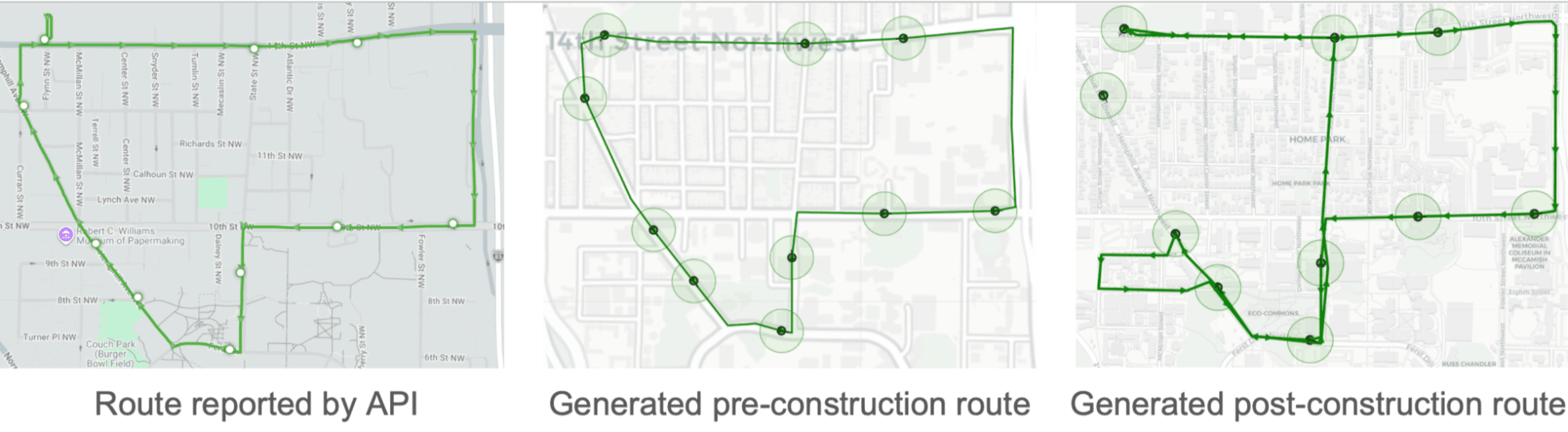 Comparison of routes
Predicting ETAs with Exponential Moving Averages
Pivot from ML to EMA
With automatic routing, the ML model faced a problem: it could not instantly adapt to the new construction routes. Although I could retrain the model daily, I wanted to see if we could simply use Exponential Moving Averages (EMA) for the stop and segment times
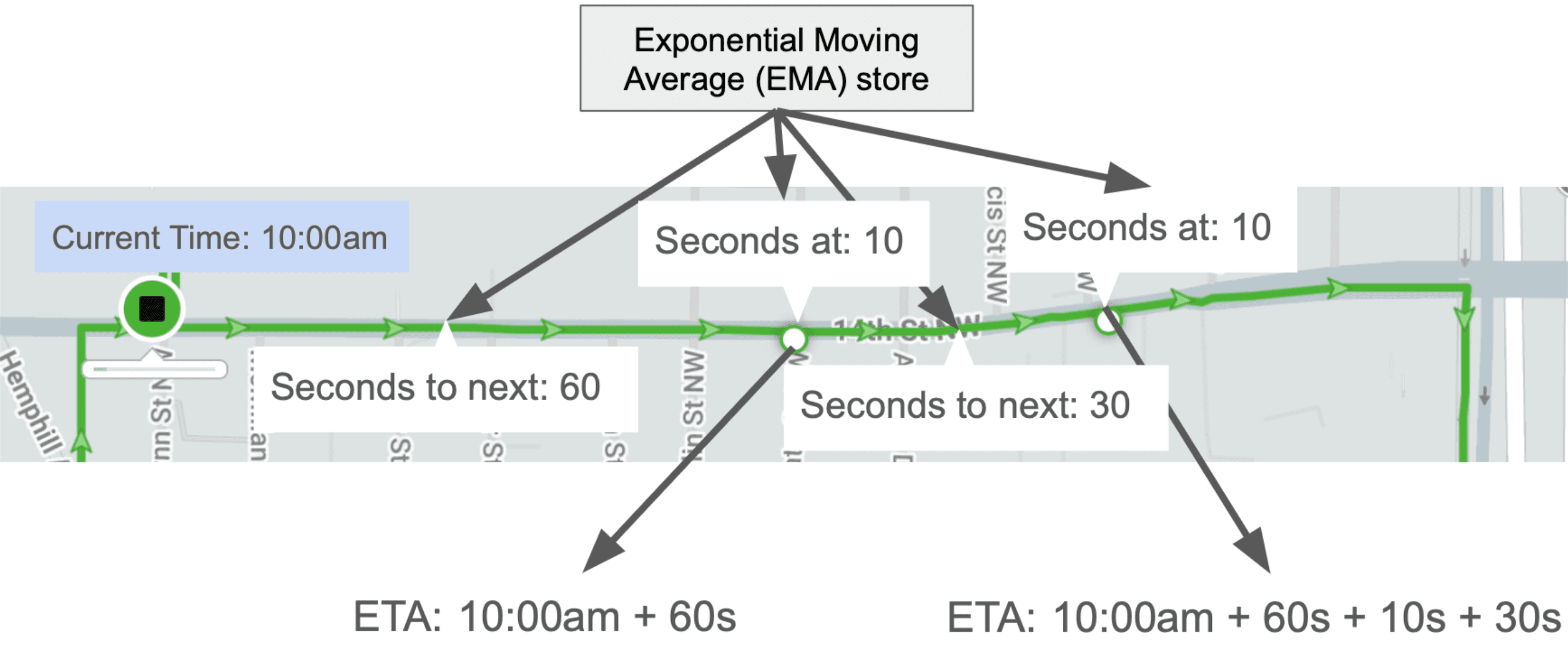 Using EMAs to predict ETAs
Clipped EMA
-
EMAs are sensitive to outliers
Because standard EMAs are highly sensitive to outliers, I used clipped EMAs. This restricts the percent change allowed in a single update, ensuring the system doesn’t instantly adapt to outliers.

-
Optimizing hyperparameters
Using a grid search, I found the optimal values for a and c which favored taking in less change from new values but allowing a wide clip percentage.
Comparison of TransLoc, ML, and EMA ETAs
After running a backtest on the EMA system using the dataset that includes post-construction data, these were the results:
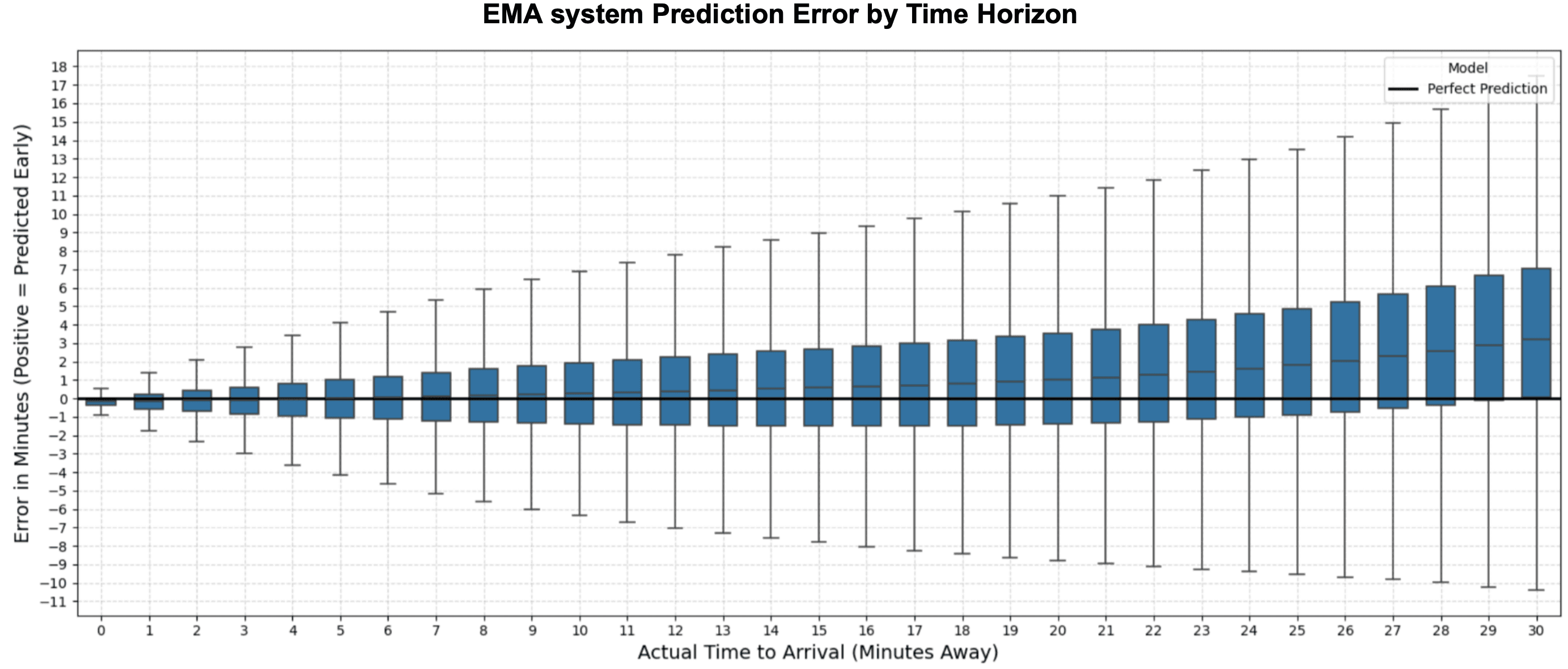 Performance of EMA system
- MAE: 176.37 seconds, MedAE: 104.15 seconds, RMSE: 301.41 seconds
We can see that the metrics are actually better than the bias adjusted ML system, and the plot shows little bias.
 TransLoc (Left) vs ML (Middle) vs EMA (Right) performance
The EMA model shows a 12.64% decrease in MAE, a 0.48% increase in MedAE, and a 20.27% decrease in RMSEcompared to the ML model.
Compared to TransLoc, EMA achieves a 35.26% decrease in MAE, a 47.58% decrease in MedAE, and a 19.68% decrease in RMSE.
Benefits of EMA
Not only did the EMA system outperform the ML system, it was a far simpler, scalable and flexible solution.
- No training required
- Less compute
- Adapts instantly to new routes
- Doesn’t require retrain for model drift
- Manual bias adjustment is not needed
Path finding
Prioritizing Time
After researching pathfinding, I looked into the Round-Based Public Transit Routing (RAPTOR) algorithm (https://www.microsoft.com/en-us/research/wp-content/uploads/2012/01/raptor_alenex.pdf). It strictly optimizes for time. However, if the algorithm strictly prioritizes time, it constantly outputs long walks. In a walkable campus setting, walking to a destination is often mathematically faster than waiting for a bus, but this ignores human physical effort.
Prioritizing Walking Distance
Conversely, if we strictly prioritize minimizing walking distance, the algorithm outputs long bus travels. For example, it might instruct a user to board a bus at the closest stop even if it's going the wrong direction, forcing them to ride a massive loop around campus just to save a few steps.
Conditional Prioritization
It was clear we needed a mix of the two. To do so, we have to translate human preference to code. The main reason people take a bus is because they prefer comfort over long walks, but only up to a certain point. This can be represented by a “walking penalty” multiplier. To choose between candidate paths, we first calculate the difference in walking time difference and difference in total time.

-
Less walk, more bus If a newly discovered path requires less walking but more total time, we check if this trade off is worth it by checking

If this is true, we accept the new path
-
More walk, less bus If a newly discovered path has more walking but less total time, we check

If this is true, we keep the new path
Conditional prioritization allows the algorithm to choose between walking or total time based on human preferences.
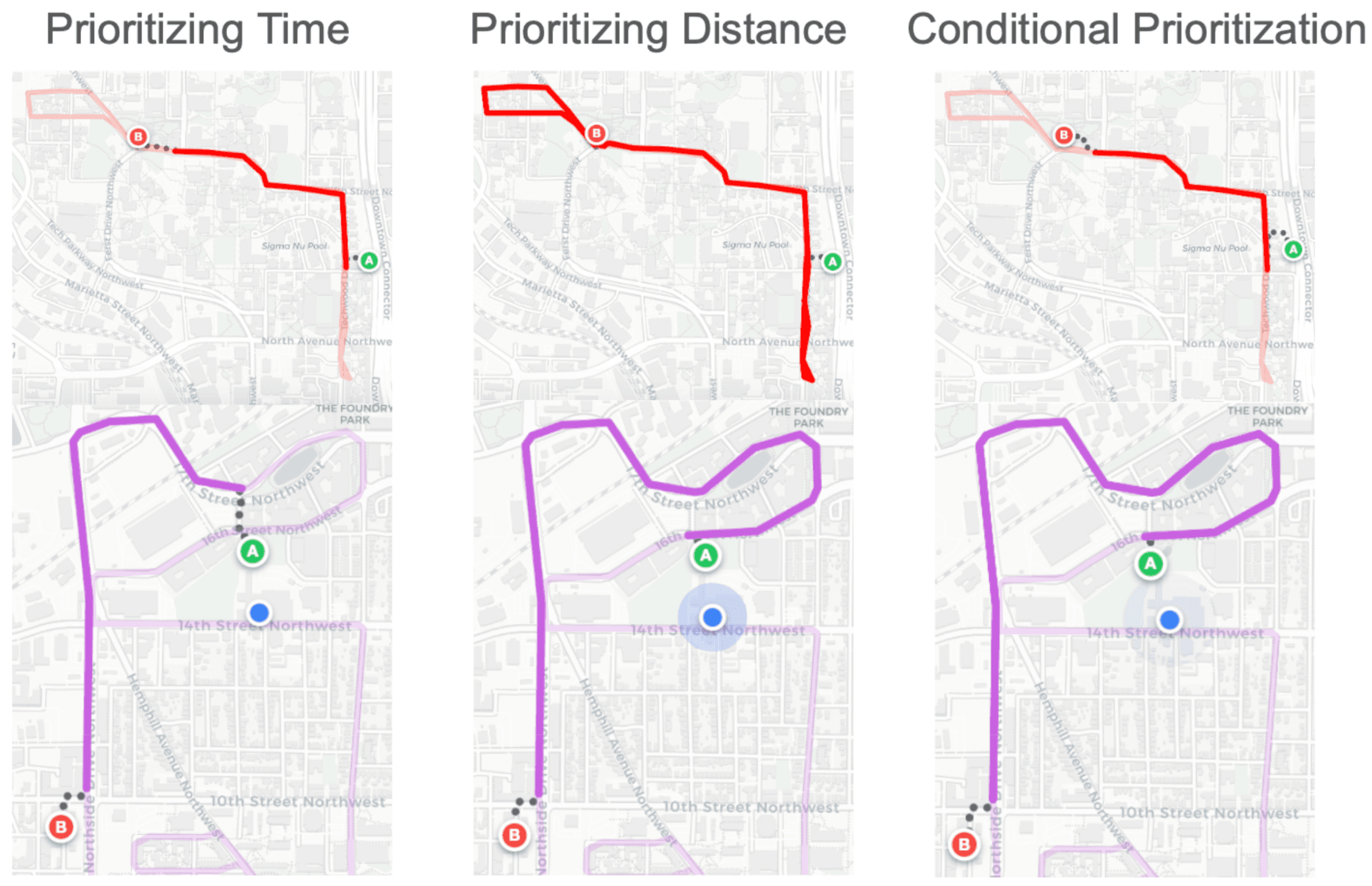 Comparison of prioritizing time, distance, and conditional prioritization
Improving UI/UX
Less is more
With the search algorithm finalized, I implemented a Google Maps-style frontend. Instead of overwhelming the user with a mess of intertwined, static lines, the UI dynamically renders only the specific route paths and ETAs relevant to their searched destination. For situational awareness, it also displays the live location of the bus to board on the map.
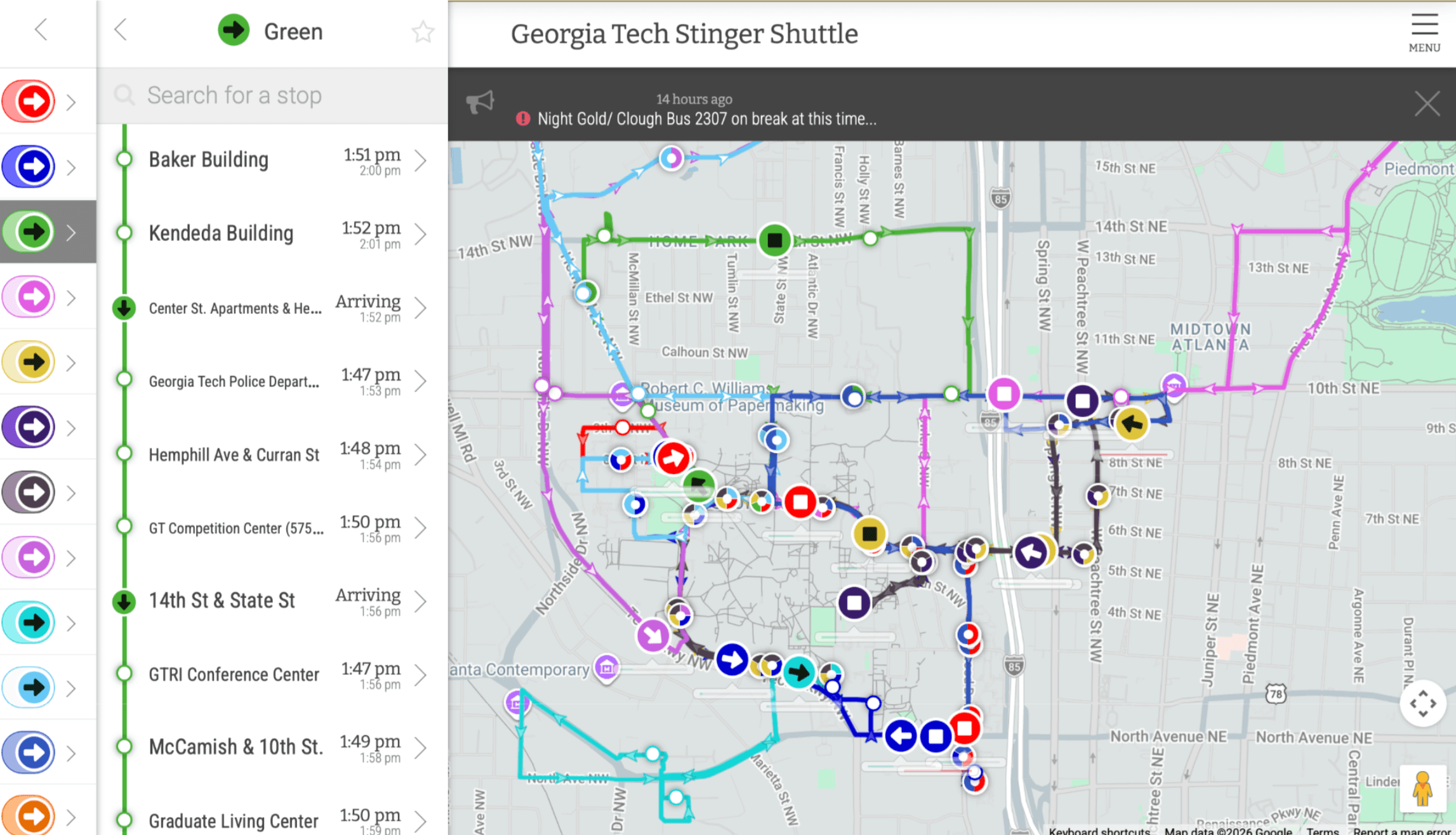 Comparison of TransLoc and Bus Forecast’s UI
The result is a highly intuitive, minimalist interface
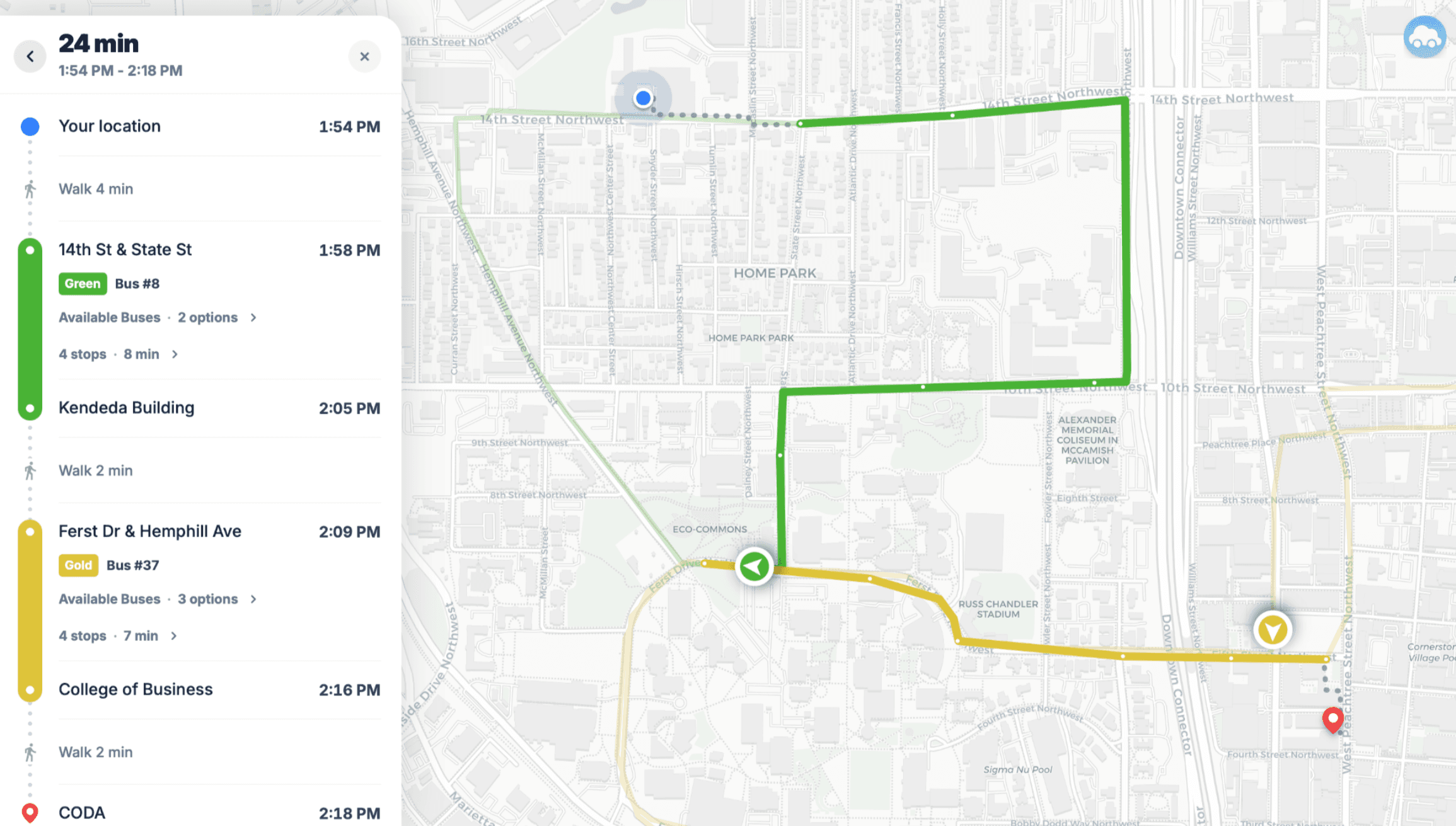 Comparison of TransLoc and Bus Forecast’s UI
Conclusion
Final outcomes
Through this project, I successfully modernized an outdated campus transit system.
- Accurate ETAs using clipped EMAs
- 35.26% decrease in MAE, a 47.58% decrease in MedAE, and a 19.68% decrease in RMSE compared to TransLoc
- Automatic mapping that adapts to any sort of route layout in real-time
- Path finding that returns results that take human preference into account
- Good UI/UX inspired by Google Maps
Limitations
-
Hardcoded boundaries for ETAs
Since the EMA predictions use historical averages rather than live features such as current speed or seconds spent at a segment, it doesn’t have the live context that a ML system would have. To account for this, the EMA system uses hardcoded upper or lower boundaries based on how far along the bus has travelled on a segment to prevent overly low or high estimates.
-
Short prediction horizon
Currently, ETAs are generated only up to one loop around the route. However, modern transit applications have a much longer time horizon and can even show arrival times for the next day by using their static timetables, which is not a realistic option in campus transit.
What I learned
-
Always have a baseline before applying machine learning
Before discovering the simple solution of using EMAs calculated ETAs, I spent months researching methods of using ML to predict ETAs. However, the ML method did not perform as well as EMAs and it was much more complicated and static. If I had started with a baseline, I would have had a clear motivation and direction for how ML could be applied to further improve upon the baseline.
-
API information is often incorrect especially for legacy systems such as TransLoc
At first, I assumed the API information to be correct, but this led to a lot of errors due to misreported data. To fix this, I had to rely as little I could on API information and engineer ways of finding what the true data is.
-
Real world conditions and data are not controllable and unpredictable
Just for Georgia Tech’s campus, there were so many different ways in which stops could be placed and routes could be drawn. In addition to this, there were many unpredictable behaviors from bus drivers such as staying at a bus stop for over an hour and completely going off route. However, the process of discovering these problems and adapting my solution to account for all these cases led to a more robust system.
Next steps
-
iOS Application
Develop an iOS application to allow for more features such as notifications or Live Activities.
-
ML + EMA predictions
Research methods to combine the immediate adaptability of the EMA system with the predictive power of gradient-boosted trees. This can also solve the problem of hardcoded boundaries.
-
Extend prediction horizon
Research methods to develop a dynamic timetable that is accurate up to 24 hours into the future.
-
Expand supported campuses
Scale the backend infrastructure to ingest and route data for other universities currently relying on outdated microtransit providers. Although this has only been implemented for Georgia Tech’s campus, it can easily be extended to other universities on TransLoc or other microtransit providers as long as their live bus data and static route information can be accessed through a public endpoint and my poor student wallet can keep up with the increased server costs.